Uniden BCD396XT · Volume 5
Uniden BCD396XT — Vol 5: Upgrades & Firmware
P25 Phase I DynamicDMA handheld
5.1 About this volume
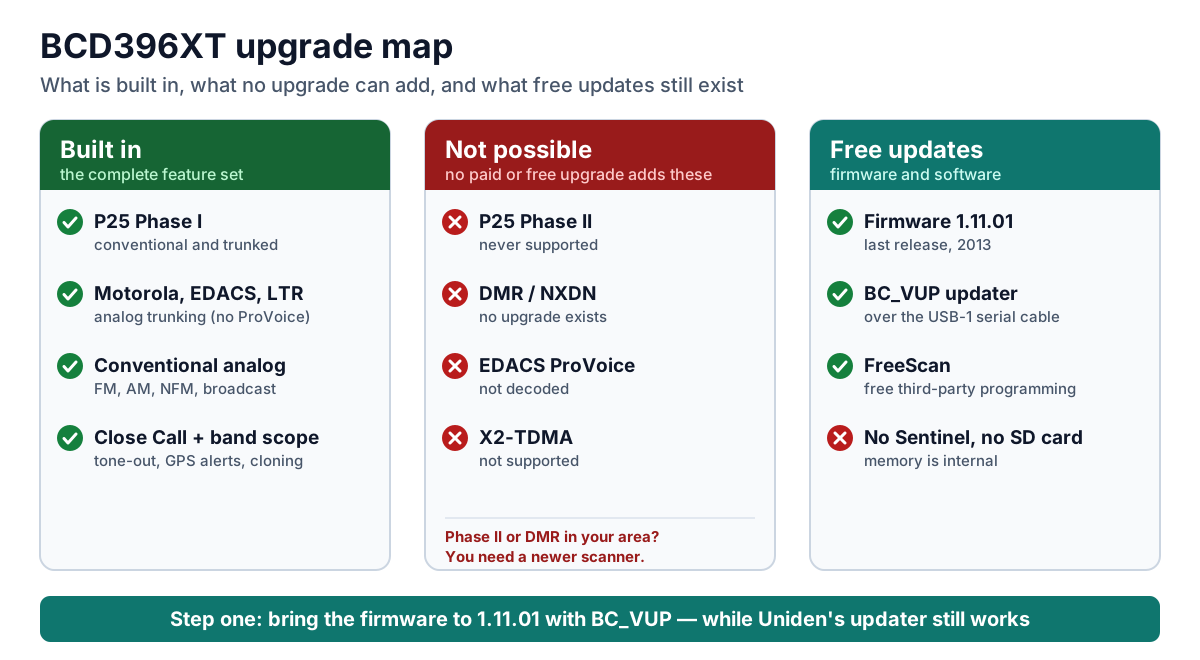
This volume answers the questions BCD396XT owners ask most often: Can it decode P25 Phase II? Is there a ProVoice, DMR, or NXDN upgrade? How is the firmware updated, and what cable does it take? The short answers:
- It decodes P25 Phase I only. The BCD396XT handles P25 Phase I (conventional, trunked, and one-frequency trunking), Motorola, EDACS with analog voice, LTR, and conventional analog.
- No upgrades of any kind exist. There are no paid keys, and nothing, free or paid, adds P25 Phase II, X2-TDMA, DMR, NXDN, or EDACS ProVoice.
- The one upgrade is free firmware. The final release is 1.11.01 (2013). You install it with Uniden’s free BC_VUP utility over the USB-1 serial cable. The scanner has no SD card and does not work with Sentinel.
- If your local systems use Phase II, DMR, NXDN, or ProVoice, you need a newer scanner.
5.2 Start here: update the firmware first
If you own a BCD396XT, bring it to firmware 1.11.01. Many 396XTs still run the firmware they shipped with in 2009 or 2010. Those units are missing the later P25 decoding improvements, which matter most on busy simulcast systems. The update is free. Uniden has released nothing since 2013 and no longer lists 396XT firmware on its download page, so update while the updater still works. Once the scanner is on 1.11.01, there is nothing newer to install.
Uniden’s firmware history for the BCD396XT:
Table 1 — Uniden's firmware history for the BCD396XT
| Version | Date | What changed |
|---|---|---|
| 1.07.00 | May 2009 | Better Close Call performance against frequency drift; fixes for the trunked priority interval and a GPS-alert lockup; removed the Control Channel Only option for Motorola systems |
| 1.08.14 | November 2009 | Unit IDs with alpha tags; fixed a memory-corruption lockup at the copyright screen and a P25 decoding stoppage; ATT indication in Close Call Only mode |
| 1.10.00 | February 2012 | Better decoding on many P25 systems; an adjustable P25 decode threshold |
| 1.11.01 | announced January 2013 | Better performance on P25 simulcast (LSM) sites, the final release |
Which firmware is the scanner running? The version is shown on screen: MENU → Settings → See Scanner Info → Firmware Version displays “Version #.##.##” along with the serial number (BCD396XT Complete Reference). BC_VUP also confirms the scanner model and firmware version when it connects.
5.3 What the BCD396XT can and cannot decode
Table 2 — What the BCD396XT can and cannot decode
| Capability | BCD396XT | If you need it |
|---|---|---|
| Conventional analog (FM, AM, NFM, broadcast) | Yes | — |
| P25 Phase I: conventional, trunked, one-frequency trunking | Yes | — |
| Motorola Type I/II (800, 900, UHF, VHF, rebanded) | Yes | — |
| EDACS Wide / Narrow / SCAT (analog voice), LTR | Yes | — |
| Close Call, band scope, tone-out, GPS alerts, wired cloning | Yes | — |
| P25 Phase II | No, and no upgrade exists | BCD436HP/BCD536HP or SDS100/SDS200 (built in) |
| X2-TDMA | No | BCD436HP/BCD536HP or SDS series (built in) |
| EDACS ProVoice | No | BCD436HP/BCD536HP or SDS series, with a paid key (about $50) |
| DMR / MotoTRBO | No | BCD436HP/BCD536HP or SDS series, with a paid key (about $60) |
| NXDN | No | BCD436HP/BCD536HP or SDS series, with a paid key (about $50–60) |
5.3.1 Checking whether a 396XT is still useful locally
Look up your county on RadioReference and check the system type of each system you care about:
- Project 25 Phase I, Motorola analog, EDACS with analog voice, LTR, or conventional channels: the 396XT works.
- Project 25 Phase II: the 396XT cannot hear its voice traffic. Most major public-safety systems have moved to Phase II.
- DMR, NXDN, or EDACS ProVoice: the 396XT cannot decode them.
Where the answer is Phase II, DMR, NXDN, or ProVoice, see the BCD536HP and SDS100/SDS200 deep dives’ Upgrades & Firmware volumes for what those scanners include and what their keys cost.
5.3.2 Common myths
Table 3 — Common myths
| You may have heard… | The facts |
|---|---|
| ”A firmware update will add P25 Phase II.” | No. No 396XT firmware release added Phase II, and none will; the last release was in 2013. |
| ”There’s a paid ProVoice upgrade for the 396XT.” | No. Uniden lists its EDACS support as “no ProVoice decoding.” ProVoice keys exist for the BCD436HP/BCD536HP and SDS series. |
| ”Sentinel programs or updates the 396XT.” | No. Sentinel is for the HomePatrol, BCDx36HP, and SDS families. The 396XT uses BC_VUP for firmware and FreeScan, ProScan, or ARC XT for programming. |
| ”Any USB cable will connect it to a PC.” | No. It has no USB port. Uniden’s USB-1 serial cable plugs into the 4-pin GPS/Remote jack. |
| ”It charges over USB.” | No. It charges installed Ni-MH cells only from its 6 V AC adapter. |
| ”A USB GPS receiver will work.” | No. It needs a GPS with RS-232 serial NMEA-0183 output; USB GPS units aren’t compatible. |
5.4 What the BCD396XT can’t hear
The BCD396XT’s gaps are permanent. It has no paid upgrades of any kind, and no firmware release adds a digital mode. The capability table above shows what it does decode.
Silent on the BCD396XT, with no upgrade path:
- P25 Phase II voice. This is the gap owners notice most, because most major public-safety systems have moved to Phase II.
- Motorola X2-TDMA. It is not among the 396XT’s supported system types.
- DMR / MotoTRBO: common on school, utility, business, and some county and fire systems.
- NXDN: used by some utilities, railroads, and county systems.
- EDACS ProVoice: the 396XT follows EDACS systems but can’t decode ProVoice voice.
The newer scanners handle all of these. The BCD436HP/BCD536HP and SDS100/SDS200 have Phase II and X2-TDMA built in, and offer DMR, NXDN, and ProVoice as paid keys. See the BCD536HP, SDS100, and SDS200 Upgrades & Firmware volumes.
Silent on every scanner, the 396XT included:
- Encrypted voice of any kind. That covers P25 Phase I and II, DMR, NXDN, and ProVoice, whether the encryption is AES, DES, or Motorola ADP. The scanner mutes it, and decrypting it would be illegal. Owners run into this more than anything else on the list: many agencies encrypt tactical, investigative, and sometimes all dispatch talkgroups.
- OpenSky (M/A-COM/Harris). It uses a proprietary, non-public protocol with no control channel, and no scanner has ever been able to monitor it. Pennsylvania’s statewide network used it until 2022.
- TETRA. It isn’t used for US public safety, and no Uniden scanner decodes it.
- Analog voice scrambling, such as voice inversion or rolling-code scramblers.
- Push-to-talk over cellular (LTE), including FirstNet push-to-talk apps, Motorola WAVE, and Harris BeOn. This travels as cellular data, not radio voice a scanner can receive.
- Anything outside the 396XT’s frequency coverage. It tunes 25–512, 758–824, 849–869, 894–960, and 1240–1300 MHz. The cellular bands are blocked by law, and nothing above 1300 MHz is covered.
Harder, but not silent: on dense multi-site P25 simulcast (LSM) systems, the 396XT decodes, but it can break up. The final firmware (1.11.01) improved this, and it’s one more reason to install it.
To check your own area system by system, use Checking whether a 396XT is still useful locally above.
5.5 How to update the firmware with BC_VUP
What you need
- A Windows PC with an internet connection. BC_VUP downloads the firmware from Uniden as it runs; the updater’s own configuration names Uniden’s server as the firmware source.
- BC_VUP 3.03.00, free from Uniden’s BCD396XT firmware page (the file is
BC_VUP_V3_03_00.zip). Unzip it and run Setup.exe, not Setup.msi. Uniden’s installing BC_VUP page covers installation. - Uniden’s USB-1 cable. This is a USB-to-serial adapter with a Prolific PL2303 chip, and it’s the only cable Uniden supports.
- Install its driver from Uniden’s USB-1 driver page. Older cables use the PL2303HXA chip and newer ones the PL2303HXD, and the older chip needs an older driver.
- Note the COM port Windows assigns (Device Manager → Ports).
- Power that won’t run out. Use fresh batteries or plug in the AC adapter for the whole update.
Update steps (from Uniden’s Using BC_VUP page)
- Connect the USB-1 cable to the scanner’s 4-pin GPS/Remote jack and to the PC, then turn on the scanner.
- Run BC_VUP and select BCD396XT.
- Choose the firmware version (normally only the latest, 1.11.01) and press NEXT.
- Press OK when prompted and select the COM port. If you don’t know it, choose AUTO DETECT.
- Press NEXT. BC_VUP confirms the scanner model and firmware version.
- Press START. Do not disconnect the cable while the update runs.
- Power the scanner down only after BC_VUP shows that the update is complete, then turn it back on.
If BC_VUP can’t find the scanner:
- Check that the driver matches your cable’s chip and that you selected the right COM port.
- Check the scanner’s baud-rate setting at Menu → Settings → Set Serial Port.
- Try a different USB port on the PC.
Back up first. Save the scanner’s programming with your programming software before updating (see Vol 3 — Codeplug backups).
5.6 Programming software
Uniden publishes no programming software for the 396XT, and Sentinel doesn’t support it. The practical choices are third-party:
- FreeScan (Sixspot Software) is free and the community’s usual choice. Version 2.18 (2015) needs .NET 4.0. Importing directly from RadioReference requires a RadioReference Premium subscription.
- ProScan is a $50 lifetime license for two PCs that adds polished programming, live monitoring, and recording.
- Butel ARC XT comes as ARC XT BASIC ($39.95) or ARC XT PRO ($69.95).
All three connect through the same USB-1 cable. None of them updates firmware; that is BC_VUP’s job.
5.7 Downloads and manuals
Firmware and software on this site. Every firmware and software release archived for the BCD396XT, including superseded versions, is listed at scanners.fubsypoly.com/downloads/#uniden-bcd396xt. Each hosted download is the original publisher’s file, unmodified, packaged with a README and SHA-256 checksums and malware-scanned; each release page carries the full README and the other versions.
Table 4 — Downloads and manuals
| Product | Recommended release |
|---|---|
| BCD396XT firmware | 1.11.01 — via BC_VUP 3.03.00 (not hosted) |
| FreeSCAN | 2.18-beta6 |
| ProScan | paid — vendor only |
| BC_VUP firmware updater | 3.03.00 |
| USB-1 cable driver (Prolific PL2303) | 1.6.0 |
Manuals in this site’s Reference Library:
Table 5 — Manuals in this site's Reference Library
| Document | Covers |
|---|---|
| BCD396XT Complete Reference | Uniden’s 273-page operating reference: system types, programming, Close Call, band scope, GPS, wired cloning, battery charging, and specifications. Uniden’s download page serves it in place of a printed owner’s manual. |
All BCD396XT documents in one list: Reference Library — BCD396XT.
Software and Uniden pages
- BCD396XT firmware page: firmware history and the BC_VUP download
- Installing BC_VUP and Using BC_VUP: Uniden’s updater instructions
- USB-1 cable drivers: Prolific PL2303 drivers
- BCD396XT specifications
- Uniden BCD396XT download page
- FreeScan, ProScan, and Butel ARC XT: programming software
- RadioReference: look up which systems your area uses
Sources
- Uniden America, BCD396XT Complete Reference (2009): supported system types (including “EDACS ESK (No ProVoice Decoding)”), controls, Close Call, band scope, GPS compatibility, wired cloning, memory, battery charging.
- Uniden: BCD396XT firmware page, BCD396XT specifications, USB-1 drivers, Installing BC_VUP, Using BC_VUP, BCD396XT download page.
- RadioReference Wiki: BCD396XT, FreeScan User Guide.
- RadioReference forums: new 396XT 1.11.01 firmware available.
- Sixspot Software FreeScan downloads; ProScan; Butel ARC XT PRO.
- RadioReference Wiki: OpenSky, Trunked Radio Systems; RadioReference forums: OpenSky scanners, TETRA.
Comments (0)