Uniden BCD536HP · Volume 5
Uniden BCD536HP — Vol 5: Upgrades & Firmware
P25 Phase II, GPS, Wi-Fi remote control
5.1 About this volume
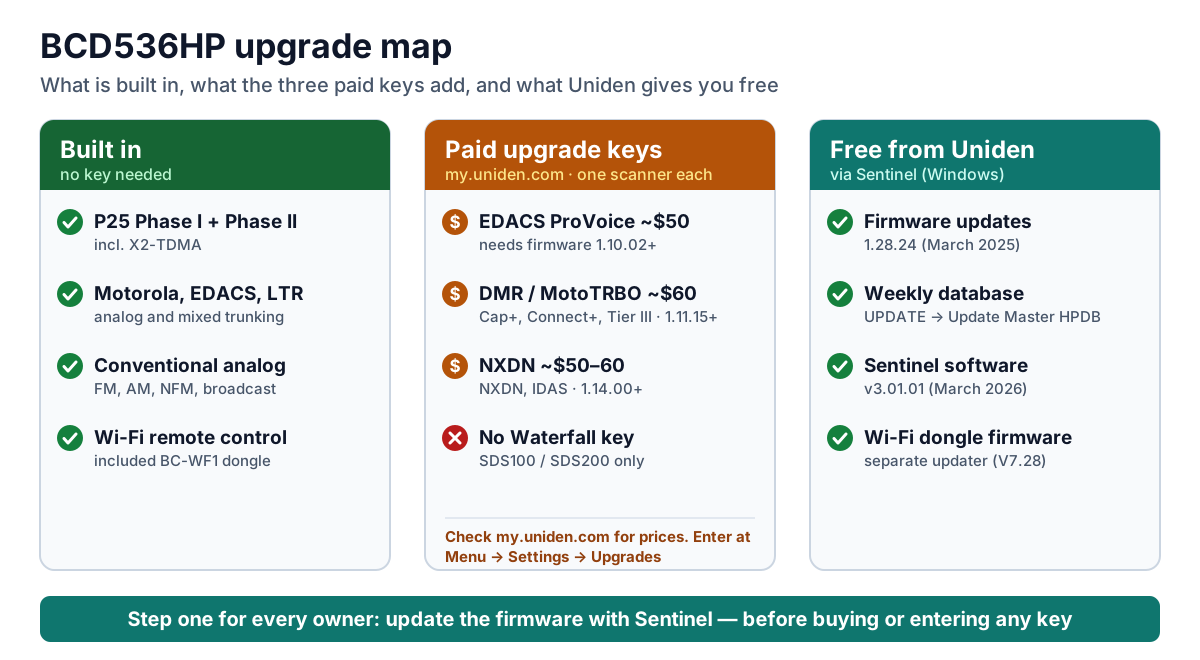
This volume answers the questions BCD536HP owners ask most often. Does it decode P25 Phase II? What do the paid upgrades add? How is a key bought and entered? How is the firmware updated, from the SD card or over USB? And what can the Wi-Fi dongle do? The short answers:
- P25 Phase I and Phase II are built in. So are X2-TDMA, Motorola, EDACS, LTR, and conventional analog. None of these needs a key.
- Three optional paid upgrade keys add EDACS ProVoice, DMR (including MotoTRBO), and NXDN. Each key is tied to one scanner and entered on the radio. The Waterfall display is not available on this model; it is an SDS100/SDS200 feature.
- Firmware and the weekly database are free. You install both with Uniden’s free Windows program Sentinel, over the USB cable or with the microSD card in a card reader.
- The Wi-Fi dongle is separate. It comes in the box, gives you remote control from a phone, tablet, or PC, and has its own firmware. It cannot update the scanner.
- Update the firmware before anything else. Each upgrade key needs a minimum firmware version, and later releases fixed real reception problems.
For day-to-day programming with Sentinel, see Vol 3 — Programming.
5.2 Start here: update the firmware first
If you do only one thing, update the firmware and the database. BCD536HPs mounted under a dash or sitting on a shelf for years often still run firmware from their first year. They are missing years of free fixes, can’t accept the paid upgrade keys, and their database no longer matches the radio systems around them. Updating is free, takes about fifteen minutes, and is the first thing to do with any used or long-idle scanner.
What free firmware has added since the BCD536HP shipped in January 2014, per Uniden’s change log:
- Support for EDACS ProVoice (firmware 1.10.02, December 2015). The feature itself needs a paid key.
- Support for DMR/MotoTRBO (1.11.15, July 2016), also with a paid key, followed by refinements for Hytera XPT systems (2017).
- Support for NXDN and Icom IDAS (1.14.00, March 2018), also with a paid key.
- A fix for newer-production units that could not decode digital signals between 171.225 and 173.9875 MHz (2022).
- NXDN fixes (2024).
- DMR Tier III multi-block grants, Motorola Capacity Max late entry, and new weather-alert event codes (1.28.24, March 2025).
As of September 2026 the current release is firmware 1.28.24 (March 24, 2025). Uniden’s BCD536HP firmware change log lists every release.
Check what your radio is running: go to Menu → Settings → See Scanner Information → Firmware Version. The same screen shows the scanner’s serial number (ESN) and a short checksum. You need both to buy an upgrade key.
The database goes stale fast. Uniden rebuilds the scanner’s radio database from RadioReference data every week. Agencies change frequencies, add talkgroups, and migrate systems constantly, so an old database can make the scanner look broken when it is simply listening in the wrong places. Update the database every few weeks, and check for firmware at the same time.
5.3 What’s built in and what’s a paid upgrade
Table 1 — What's built in and what's a paid upgrade
| Capability | Status on a US BCD536HP | Typical use | Price (my.uniden.com) |
|---|---|---|---|
| Conventional analog (FM, AM, NFM, broadcast) | Built in | Everything analog | Included |
| P25 Phase I and Phase II, including X2-TDMA and one-frequency trunking | Built in | Most US public-safety systems | Included |
| Motorola, EDACS, and LTR trunking | Built in | Older trunked systems | Included |
| Discovery, Close Call, tone-out, SAME weather | Built in | Finding signals and alerts | Included |
| Wi-Fi remote control (BC-WF1 dongle) | Included in the box | Control from a phone, tablet, or PC | Included |
| EDACS ProVoice | Paid key; firmware 1.10.02 or later | Digital voice on some EDACS systems | About $50 |
| DMR / MotoTRBO: conventional DMR, Capacity Plus, Connect Plus, Linked Capacity Plus, DMR Tier III | Paid key; firmware 1.11.15 or later | Business, utility, school, and some government systems | About $60 |
| NXDN: NXDN trunking and one-frequency trunking, Icom IDAS | Paid key; firmware 1.14.00 or later | Utilities, railroads, business fleets | About $50–60 |
| Waterfall display | Not available on this model | SDS100 and SDS200 only | — |
Uniden’s own pages give ProVoice at $50 and DMR at $60 (at its 2016 launch). NXDN launched at $30 and has since been quoted at both $50 and $60. Uniden’s store requires a login, so check my.uniden.com for current pricing. Dealers charge more for the same keys.
5.3.1 Choosing upgrades
Only buy a key for systems you actually want to hear:
- Look up your county on RadioReference and open the trunked systems and frequency listings you care about.
- Check each system’s type or mode and match it to a key:
- DMR, MotoTRBO, Capacity Plus, Connect Plus, Linked Capacity Plus, Capacity Max, or Tier III need the DMR key.
- NXDN, NEXEDGE, or IDAS need the NXDN key.
- EDACS with ProVoice needs the ProVoice key.
- Project 25 (Phase I or II) needs nothing.
- If none of your systems use those modes, you don’t need any key.
A key unlocks a decoder that is already in the firmware; it does not change the hardware.
5.3.2 Common myths
Table 2 — Common myths
| You may have heard… | The facts |
|---|---|
| ”ProVoice is built in on the BCD536HP.” | No. It is a paid key, available since firmware 1.10.02. Some references list it as standard; Uniden sells it as an upgrade. |
| ”ProVoice is only available on the SDS scanners.” | No. Uniden offers the ProVoice key for the BCD436HP and BCD536HP too. |
| ”The BCD536HP can get the Waterfall display.” | No. Waterfall is an SDS100/SDS200 upgrade only. |
| ”You need a PC running ProScan to use Wi-Fi.” | No. The included dongle lets phones, tablets, and PCs connect directly. ProScan is optional. |
| ”The Wi-Fi dongle can update the firmware or database.” | No. Updates need Sentinel, over USB or with a card reader. |
| ”You install upgrade keys with Sentinel.” | No. Keys are entered on the scanner. |
| ”The database needs a RadioReference subscription.” | No. Uniden’s weekly database is free. RadioReference Premium is only needed for direct RadioReference imports in ProScan or ARC536. |
| ”The BCD536HP has built-in GPS.” | No. An external GPS receiver connects to the rear serial port. |
5.4 What the BCD536HP can’t hear
With all three keys installed, the BCD536HP decodes nearly all unencrypted US public-safety voice. Some voice still stays silent.
Silent until you buy the key (see the table above):
- DMR / MotoTRBO: common on school, utility, business, and some county and fire systems.
- NXDN: used by some utilities, railroads, and county systems.
- EDACS ProVoice: found on a few older state and county EDACS systems.
Silent no matter which keys you buy:
- Encrypted voice of any kind. That covers P25 Phase I and II, DMR, NXDN, and ProVoice, whether the encryption is AES, DES, or Motorola ADP. The scanner mutes it, and decrypting it would be illegal. Owners run into this more than anything else on the list: many agencies encrypt tactical, investigative, and sometimes all dispatch talkgroups.
- OpenSky (M/A-COM/Harris). It uses a proprietary, non-public protocol with no control channel, and no scanner has ever been able to monitor it. Pennsylvania’s statewide network used it until 2022.
- TETRA. It isn’t used for US public safety, and no Uniden scanner decodes it.
- Analog voice scrambling, such as voice inversion or rolling-code scramblers.
- Push-to-talk over cellular (LTE), including FirstNet push-to-talk apps, Motorola WAVE, and Harris BeOn. This travels as cellular data, not radio voice a scanner can receive.
- dPMR. Uniden has never offered it for this model; it is sold only for the European SDS models.
- Anything outside the BCD536HP’s frequency coverage. It tunes 25–512, 758–960, and 1240–1300 MHz, and the cellular bands inside that range are not scanned. Nothing above 1300 MHz is covered, including the 4.9 GHz public-safety band, which carries mostly data anyway.
Harder, but not silent: on dense multi-site P25 simulcast (LSM) systems, the BCD536HP decodes, but it can break up where the SDS100/SDS200’s True I/Q receiver stays clean.
How to check your area. Look up each system you care about on RadioReference:
- Project 25 (Phase I or II), Motorola analog, EDACS, or LTR: the BCD536HP hears it with no key.
- DMR, NXDN, or ProVoice: you need that key.
- Encrypted talkgroups (a mode ending in E, such as DE or TE) or an OpenSky system: no scanner will help.
Some older “unscannable” lists still include EDACS ProVoice. They are out of date: Uniden sells a ProVoice key for this scanner.
5.5 Buying and entering an upgrade key
- Update the firmware first (see the next section). Each key needs a minimum firmware version, and the latest release avoids surprises.
- Find the scanner’s ESN and checksum. Go to Menu → Settings → See Scanner Information → Firmware Version. The 14-digit serial number follows SN on the third line, and the 3-character checksum is on the fourth line. Copy both carefully; the key is generated for that exact radio.
- Buy the key. Register the scanner at my.uniden.com, open it from your list of devices, and use the upgrade link for the feature you want. The key appears in your account and is emailed to you.
- Enter the key on the scanner.
- Go to Menu → Settings → Upgrades (some Uniden pages spell it Upgrade) and choose the feature, such as DMR/MotoTRBO Upgrade, then press E.
- Turn the scroll control to pick each character, and use 4 and 6 to move the cursor left and right.
- Enter the entire key, including the hyphens, then press E.
Things to know before you buy:
- Keys are tied to one scanner. Dealers describe them as non-transferable and non-refundable.
- Keep your my.uniden.com account and the emails. If a key ever needs re-entering, you can retrieve it there.
5.6 How to update: Sentinel over USB
This is Uniden’s documented method and the one to try first.
What you need
- A Windows 10 or 11 PC with an internet connection. Sentinel is Windows-only, downloads firmware and the database while it runs, and sometimes needs Run as administrator.
- Sentinel, free from the BCD536HP download page. The current version is Sentinel 3.01.01 (zip).
- This is the same program that serves the BCD436HP and the SDS100/SDS200. It is not the HomePatrol Sentinel.
- Unzip the download and run setup.exe.
- The supplied USB cable in the scanner’s front mini-USB port. The rear USB jack is only for the Wi-Fi dongle.
- Steady power. Keep the AC adapter or vehicle power connected for the whole update.
Update the firmware
- Turn the scanner on and connect the USB cable to the PC.
- When the scanner asks, select Mass Storage. It shows USB Mass Storage while connected.
- Start Sentinel, select UPDATE → Update Firmware, and follow the prompts. Sentinel checks Uniden’s server and writes the latest firmware to the scanner’s card.
- When Sentinel finishes, turn the scanner off before unplugging the cable so it can finish writing to the card. Uniden warns that cutting power while the card is being written can corrupt it.
- Turn the scanner back on and let it apply the update without interruption.
- Confirm the new version under Menu → Settings → See Scanner Information → Firmware Version.
Update the database
- Reconnect in Mass Storage mode.
- In Sentinel, select UPDATE → Update Master HPDB.
- Select Scanner → Write to Scanner to copy the database to the BCD536HP.
- Turn the scanner off, unplug, and power up.
Before big changes, back up the card. A copy of the microSD card is a complete backup of the scanner’s configuration (Vol 3 — Codeplug backups).
5.7 Alternative: update the microSD card in a card reader
The BCD536HP keeps its Favorites Lists, settings, database, recordings, and firmware update files on its microSD card. That means Sentinel can do the same work with the card in an ordinary PC card reader, treating the card as though it were the scanner. Use this when the USB connection won’t work, is slow, or keeps failing, or when the scanner is installed where a PC can’t easily reach it.
Steps
- Turn the scanner off. The card slot is on the front panel. Push the card in with a thumbnail or a pencil eraser and it springs out.
- Put the card in a microSD card reader (or an SD adapter in a standard reader) on the Windows PC.
- Start Sentinel. If the card doesn’t appear, tick Display all drives.
- Run UPDATE → Update Firmware, then UPDATE → Update Master HPDB and Scanner → Write to Scanner, just as over USB.
- Eject the card safely in Windows and push it back in until it clicks into place.
- Power on the scanner and let it finish applying any update.
Rebuilding a corrupted card
If the scanner reports card errors or won’t start properly:
- Back up whatever you can first. Copy the card’s files, and save your Favorites Lists in Sentinel.
- Format the card with the SD Association’s free SD Memory Card Formatter. Uniden supports cards up to 32 GB.
- Windows may hide the empty drive. If it does, turn off Hide empty drives in File Explorer’s options.
- In Sentinel, run Clear User Data on the card (tick Display all drives). This recreates the scanner’s files and folders.
- Run Update Firmware, update the database, and use Scanner → Write to Scanner to restore your Favorites Lists.
Formatting erases everything on the card, including recordings.
5.8 The Wi-Fi dongle
The BCD536HP ships with Uniden’s BC-WF1 Wi-Fi dongle, which plugs into the USB jack on the rear panel. Set it up at Menu → Wi-Fi Setup:
- Infrastructure mode joins your home router.
- Access Point mode makes the scanner its own Wi-Fi network for up to five devices. You set the network name (SSID), the security type, and the password.
- Show Wi-Fi Information displays the IP address, MAC address, and the dongle’s firmware version.
Once connected, you can control the scanner from Uniden’s Siren app (iOS; still listed, but not updated since 2015) or from ProScan, which also streams the scanner’s audio. The Wi-Fi link cannot update the scanner’s firmware or database.
Dongle firmware: if Show Wi-Fi Information reports the dongle’s version as 5.01 or 0.00, update the dongle before troubleshooting anything else. Uniden’s BC-WF1 firmware updater installs version 7.28 over a USB serial connection and needs the STM virtual COM port driver first. Uniden’s current recovery instructions and its Wi-Fi-Updater package (updater 0.00.05) are on the BCD536HP firmware page. The older BCD536HP Wi-Fi Test page is the 2014–15 beta page and carries the earlier updater 0.00.03.
5.9 ProScan and ARC536
Two third-party programs are popular with BCD536HP owners. Neither updates firmware or installs upgrade keys, so keep Sentinel installed for those jobs.
- ProScan, version 24.13 (September 2026): a $50 lifetime license for two PCs, with a 30-day trial. It adds programming, Wi-Fi control and audio streaming, recording, and a web-server remote. Its FAQ notes that Sentinel is still needed for firmware updates.
- Butel ARC536PRO, version 2.8: $69.95 programming software for the BCD536HP, with a free demo.
5.10 Downloads and manuals
Firmware and software on this site. Every firmware and software release archived for the BCD536HP, including superseded versions, is listed at scanners.fubsypoly.com/downloads/#uniden-bcd536hp. Each hosted download is the original publisher’s file, unmodified, packaged with a README and SHA-256 checksums and malware-scanned; each release page carries the full README and the other versions.
Table 3 — Downloads and manuals
| Product | Recommended release |
|---|---|
| BC-WF1 Wi-Fi dongle firmware | 7.28 |
| BCD436HP main firmware | 1.28.24 — via Sentinel (not hosted) |
| BCD536HP main firmware | 1.28.24 — via Sentinel (not hosted) |
| ProScan | paid — vendor only |
| BC-WF1 Wi-Fi dongle firmware updater | 0.00.05 |
| STM Virtual COM Port driver (BC-WF1) | 1.3.1 |
| RH-536HP mkII remote control test program | 0.2.0.17 |
| BCDx36HP Sentinel | 3.01.01 |
| Uniden USB serial driver | 1.0.0.0 (2014-01-01) |
Manuals in this site’s Reference Library:
Table 4 — Manuals in this site's Reference Library
| Document | Covers |
|---|---|
| BCD436HP/BCD536HP Owner’s Manual (2024 edition) | The current manual: setup, controls, Wi-Fi setup, Sentinel, firmware and database updates, microSD card |
| BCD436HP/BCD536HP Owner’s Manual (2013 edition) | The original launch-era manual |
| BCD536HP Wi-Fi Streaming & Remote Access via ProScan | Setting up ProScan’s remote control and audio streaming over Wi-Fi |
All BCD536HP documents in one list: Reference Library — BCD536HP.
Software and Uniden pages
- Uniden BCD536HP download page: Sentinel and manuals
- Sentinel 3.01.01 (zip): direct download
- BCD536HP firmware change log: what each firmware release changed
- Uniden ProVoice upgrade page and DMR upgrade page: Uniden’s descriptions and key-entry steps
- BCD536HP firmware page: also carries the Wi-Fi dongle recovery instructions and the Wi-Fi-Updater package (updater 0.00.05)
- my.uniden.com: register the scanner, buy and retrieve upgrade keys
- SD Memory Card Formatter: rebuilding a card
- ProScan and Butel ARC536PRO: third-party software
- RadioReference: look up which systems your area uses
Sources
- Uniden America, BCD436HP/BCD536HP Owner’s Manual: included accessories, controls, Wi-Fi setup, USB Mass Storage mode, firmware and database update procedures, microSD removal and reformatting, audio warnings.
- Uniden: BCD536HP firmware change log, ProVoice upgrade, DMR upgrade, BCD536HP Wi-Fi Test page (2014–15 beta builds), BCD536HP download page.
- A labeled photo of the BCD536HP rear panel (on file for this project).
- RadioReference Wiki: BCD536HP.
- RadioReference forums: DMR/NXDN upgrade pricing for the BCD436HP/BCD536HP.
- Scanner Master: Wi-Fi on the BCD536HP; Bearcat Warehouse upgrade keys.
- ProScan; Butel ARC536PRO.
- RadioReference Wiki: OpenSky, Trunked Radio Systems; RadioReference forums: OpenSky scanners, TETRA.
Comments (0)