Uniden SDS200 · Volume 1
Uniden SDS200 — Vol 1: Introduction & Hardware
Sibling of SDS100 with more output/inputs
1.1 About this volume
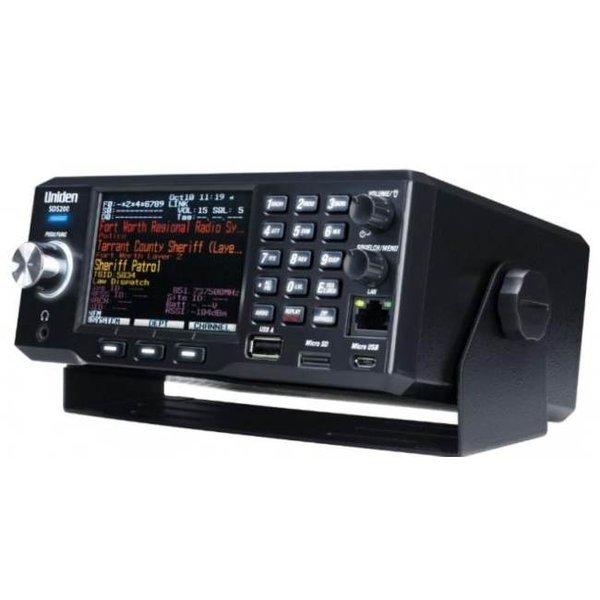
The Uniden SDS200 is the top-end base/mobile digital scanner in the lineup — the sibling to the SDS100 (Vol 13) covered in the preceding volume. The two radios share the same TrueIQ baseband architecture, the same Sentinel/ProScan toolchain, the same favorites-file codeplug format, the same paid upgrade keys (DMR, NXDN, ProVoice, Waterfall), and the same weekly Uniden database. What’s different is the wrapper: the SDS200 trades the SDS100’s water-resistant handheld shell, internal battery, and SMA antenna for a base/mobile chassis — a larger 3.5-inch 480 × 320 color display, a 3 W audio amplifier with an external-speaker jack and a headphone jack, an Ethernet (LAN) port, a BNC antenna jack, a DC power input plus a mobile power harness, and a dedicated GPS jack. Announced in early 2019 and shipping from about April 2019 at a $749 list price, the SDS200 is what Uniden built for the shack and the dashboard rather than the belt.
The two radios are best understood as a matched pair: the SDS200 lives on the bench as the always-on shack scanner driven by an outdoor discone with no battery to babysit; the SDS100 is the same radio that gets unplugged and walked out the door when the operator needs to be mobile in a way the SDS200 can’t accommodate. Both consume the same Sentinel favorites file — the codeplug curated in ProScan is written to both radios from the same workflow (§5 covers the master-codeplug discipline). For the shared-architecture material — TrueIQ baseband, the full digital-mode decoder list (P25 Phase I + II, DMR, NXDN, EDACS, LTR, Motorola Type II, ProVoice), the ProScan/Sentinel tooling, the database and upgrade keys — read Vol 13 §3 and §4 ↗ first; this volume does not re-derive that material and instead documents the per-form-factor deltas (the larger display, the rear-panel I/O complement, the Ethernet remote-control story, the vehicle-installation considerations, and the audio-output architecture that lets the SDS200 drive a shack monitor in a way the SDS100 fundamentally cannot).
Why someone on the bench wants both: the SDS100 wins where the SDS200 cannot go (the parade, the incident, the parking lot, the unfamiliar town), and the SDS200 wins where the SDS100 fails (the desk where you want a 3.5” display visible from across the room, the dashboard where you want a fixed 12 V install, the basement equipment rack where you want Ethernet-controlled remote operation from upstairs). Why someone on the bench doesn’t want both: the operating-experience overlap is enormous, the favorites file is identical, and operators who only ever scan from one location or only ever scan from the dashboard can save the second purchase. The SDS100 is the broader-utility unit if forced to pick one; the SDS200 is the better unit if you have a permanent install location worth the larger chassis. This bench is set up for the both-of-them case — see the home-base posture mapping in Vol 1 §8 ↗.
The bench role earned by the SDS200 is twofold: home-base scanner running 24/7 off the outdoor discone with audio piped to a shack monitor (or streamed to a recording PC for archive), and vehicle scanner when installed under-dash with a NMO mag-mount wideband antenna. The dual role matters because the SDS200 is the only scanner in the lineup with the audio I/O and the chassis robustness to do both jobs without compromise; the BCD536HP (Vol 15) covers the same base/mobile niche at lower cost but without TrueIQ baseband, and the legacy Uniden scanners (Vols 17-20) lack the digital decode set entirely.
1.2 Hardware tour
Uniden’s specifications put the SDS200 at 180 mm wide × 160 mm deep × 72 mm high (7.08 × 6.29 × 2.83 in) and 1400 g (49.4 oz) without the antenna. It mounts in a vehicle dash with the optional DIN-E sleeve or a standard ISO mounting, and ships with a mounting bracket, DC adapter, mobile power harness, and a BNC telescoping antenna. The build is the same molded ABS chassis Uniden has used across the digital line for a decade — it’s not ruggedized like a Motorola APX, but it’s solid enough for dash-mount life and survives the vibration profile of a long highway run without acting up.
Front panel. The dominant feature is the 3.5-inch color display — substantially larger than the SDS100’s handheld panel, and the practical reason most operators who do both portable and base settle on owning both radios rather than choosing. The larger display surfaces more system/site/channel context simultaneously without paging; for complex urban codeplugs with many overlapping P25 systems and conventional channels, the SDS200 display reduces the time spent navigating menus by a meaningful amount. The display is not a touchscreen (neither SDS model has one); all interaction is via the knobs, the keypad, and three soft keys.
The controls, per Uniden’s manual: a scroll knob (turn to move through menus, channels, and frequencies; push for FUNC), a Volume/Light knob (turn to power on and set volume; tap for the backlight), and a Squelch/Menu knob (turn for squelch; press for the menu), plus Avoid, Zip/Services, Replay/Record, three soft keys, and number keys with second functions. Front-panel connections include the headphone jack, the mini-USB port used for PC programming and firmware updates (front-panel placement confirmed on this bench unit), a USB Type-A jack that Uniden reserved for future expansion (it has no function today beyond supplying power), and the Ethernet (LAN) port — which is not on the rear panel. Firmware updates run only through Sentinel — over USB in Mass Storage mode, or with the microSD card in a PC card reader; there is no USB thumb-drive update path (see §4 and Vol 5).
The SDS200’s audio path is built around a 3 W audio amplifier driving a single internal speaker that is noticeably louder than the SDS100’s; subjectively, on a noisy bench, the SDS200’s internal speaker is loud enough to be heard across the room without an external speaker, where the SDS100’s internal speaker effectively requires headphones or an external speaker in the same scenario. This is the second reason (after the display) that the SDS200 earns shack-residency for operators who want passive monitoring without parking their head next to the radio.
Rear panel. Where the SDS200’s permanent connections live:
- BNC antenna jack. One of the most consequential form-factor deltas — the SDS100 uses SMA (handheld-standard) while the SDS200 uses BNC, which is mechanically robust and suits semi-permanent feedline runs from an outdoor antenna. Discones with N connectors (Diamond D-130NJ, Comet DS-150S — see §6) need a short N-to-BNC adapter or patch cable, and operators who own both radios invariably accumulate SMA-BNC adapters.
- DC power input and mobile power harness connector. Uniden supplies a DC adapter and a mobile power harness for vehicle installation (TBD — verify polarity and connector dimensions before fabricating any custom DC harness). A regulated 13.8 V supply is the right shack feed.
- External speaker jack (EXT SP). Plugging in an external speaker mutes the internal one; Uniden rates the audio output at 3 W into an 8 Ω external speaker, enough to drive a small shack speaker well above the internal driver.
- GPS jack. A dedicated modular serial jack for an external NMEA-0183 GPS receiver. The SDS200 has no built-in GPS — nor does the SDS100 — so this jack is how it gains location-aware site selection: sites and departments are automatically avoided and un-avoided as the radio moves. Set the serial-port baud rate to match the receiver.
- Micro-USB port. A secondary serial port with no everyday role.
Two more connections are worth knowing:
- microSD card. Same role as on the SDS100 — it holds Favorites Lists, profiles, settings, the master database, Discovery sessions, recordings, and firmware update files. The slot is spring-loaded: push the card in to release it, and treat it gently, since owners report worn slots. Uniden supports cards up to 32 GB; class 10 or better is wise for recording. Because the card is the live configuration, a card copy is a complete backup.
- Ethernet (LAN). The SDS200’s most-underused feature. Configure it under Menu → Settings → LAN Settings (DHCP or a manual IP address; the menu also offers a built-in FTP server with read-only and writable accounts). ProScan can then control the radio and stream its audio over the network — remote operation from another room, and Broadcastify feeds without a PC sound card. The practical use case is putting the radio near the antenna feedline entry (short coax, lower loss) and operating it from the upstairs desk.
Internal architecture. The True I/Q receiver chain is the same as the SDS100’s — wideband front end, I/Q sampling, DSP-domain channelization and demodulation. The SDS200 adds the larger display, the 3 W audio amplifier, and the network interface. Neither model has Bluetooth or Wi-Fi.
Comments (0)