Uniden SDS100 · Volume 1
Uniden SDS100 — Vol 1: Introduction & Hardware
TrueIQ baseband, P25 Phase II, ProVoice option, DMR/NXDN
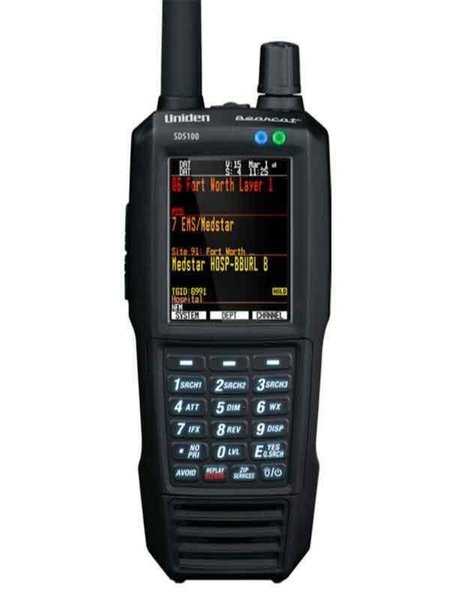
1.1 About this volume
The Uniden SDS100 (released 2018, still the current flagship handheld in 2026) is the top-end digital scanner in the lineup and the daily-driver portable scanner. It earns the bench slot for two distinct reasons: it is the only handheld in the lineup with a software-defined-radio “TrueIQ” baseband decoder rather than the discrete heterodyne-and-narrowband-FM architecture used in every prior Uniden handheld, and it is the only handheld that has kept up with the slow drift of US public-safety systems through P25 Phase I → P25 Phase II → simulcast P25 Phase II → DMR Tier II → NXDN 4800/9600 → MotoTRBO Connect Plus encoded over the same infrastructure. The previous-generation BCD396XT (covered in Vol 16) can decode P25 Phase I and analog conventional/trunked just fine; the SDS100 is what you need for everything that came after 2014.
The “TrueIQ” architecture matters because the alternative — discrete narrowband-FM with software demodulation — falls down hard on Linear Simulcast Modulation (LSM), the modulation scheme used by most modern P25 simulcast systems. LSM is a continuous-phase 4-level FSK variant that constructively combines the partially-overlapping signals from multiple co-channel transmitter sites. A scanner that just demodulates one signal hears all the others as noise; a scanner that captures full-bandwidth IQ and runs the LSM-correlator in software recovers clean audio from the same RF that sounds like garbage on the older scanners. Uniden’s implementation is good enough that the SDS100 is the de-facto recommendation in the RadioReference and ScannerMaster forums for any operator within range of an LSM simulcast system — and for newer systems being built today, LSM is the default.
Why the SDS100 over the SDS200 (Vol 14). Same True I/Q architecture in a base/mobile form factor — AC and 12 V powered, a larger 3.5-inch display, louder audio, an Ethernet port, and no battery. (Neither model has a built-in GPS receiver; both accept an external one.) The SDS200 wins for the home base behind an outdoor discone; the SDS100 wins for incident scanning, the go-bag, and travel. This bench runs both — SDS200 at home base, SDS100 portable.
Why the SDS100 over the BCD536HP (Vol 15) or BCD396XT (Vol 16). Both are pre-True I/Q architecture. The BCD536HP decodes P25 Phase I and II and takes paid DMR, NXDN, and ProVoice keys; the BCD396XT is P25 Phase I only, with no upgrade path to Phase II, DMR, or NXDN. Either is the right scanner for a 2014-vintage system; the SDS100 is the right scanner for a 2026-vintage system. Both stay on the bench as backups and as scanner history.
This is a receive-only scanner — no transmit hardware. The legal envelope is “what is legal to monitor” rather than “what is legal to transmit”; see Vol 4 (Frequency Planning & License Envelope) for the deep treatment, and the brief framing in §3.5 below.
1.2 Hardware tour
The SDS100 is a handheld built to Uniden’s JIS4 / IPX4 water-resistance rating — resistant to splashing water from any direction, not to jets or submersion. It was released in June 2018 at a $699 list price. The front face is a 240 × 320 color LCD with multiple backlight levels and a choice of full-color or high-contrast black-and-white display modes for direct sunlight. The screen is not a touchscreen; all input is via the keypad and the scroll knob.
1.2.1 Front-panel controls
Uniden’s owner’s manual (Controls and Indicators) lists these keys; most have a second function reached by pressing Func first:
- Power/Light — press and hold to turn the scanner on or off; tap to toggle the display backlight
- Scroll knob — moves through menus, channels, and settings; press Func and tap the knob to show the current squelch setting
- Menu — enters Menu mode or backs up one level; Func + Menu opens the Search or Close Call menu in those modes
- Three soft keys — their job changes with the mode and is labeled at the bottom of the display (for example System and Department during scan)
- Avoid — tap once to avoid the current channel temporarily, twice to avoid it permanently; combined with a soft key it avoids a whole system or department
- Zip/Services — enter a ZIP or postal code; Func + Zip picks the service types to scan
- Replay/Record — replay the last transmissions; Func + Replay starts and stops recording; press and hold to review recordings
- Number keys 0-9 — select Favorites List Quick Keys during scan and enter numbers; second functions include SRCH1-3 (assigned searches), ATT (attenuator), DIM (display brightness), WX (weather priority), and IFX (IF exchange)
- Func — arms the second function of the next key; Func + Power locks the keypad
Two LEDs above the display show charge status (right: red while charging, green when charged) and channel alerts (left, programmable in seven colors).
Operators coming from older Uniden scanners (BCD396XT, BC246T) will find the basic operation familiar but the Favorites List architecture different (see the Operations volume).
1.2.2 Connectors
- Antenna — SMA female on top. An SMA-to-BNC adapter is included for BNC-terminated antennas; for an N-connector base antenna, use an SMA-male-to-N-female adapter or terminate the coax in SMA-male.
- Two USB ports on the side — neither is USB-C. The mini-USB port (marked Charge) is the one that matters: PC programming and firmware updates with Sentinel, battery charging, and the connection point for an external GPS receiver. The micro-USB port can power the radio but does not charge the battery; it connects to the scanner’s secondary processor and has no everyday role.
- Headphone jack for earphones or an external powered speaker.
When a USB cable is connected, the scanner asks for a mode: Mass Storage (press E/yes) exposes the microSD card to the PC for Sentinel, database updates, and firmware updates; Serial Port (press ./no) is for audio streaming, raw data, and control by third-party software. Turn the scanner off before unplugging the cable so it can finish writing to the card.
The microSD card sits under the battery: remove the back cover and the battery pack, slide the card holder to the right, and lift the card out. Uniden supports cards from 1 GB to 32 GB. The card holds everything — Favorites Lists, profiles, settings, the radio database, Discovery sessions, recordings, and firmware update files — which is why card backups matter (see the Programming volume, and Vol 5 — Upgrades & Firmware for updating from the card).
The battery is Uniden’s BPS100 3.7 V lithium-ion pack (early production shipped 3600 mAh packs; current packs are 5400 mAh). It charges inside the radio from the mini-USB port: a source rated 1 A or more is needed to charge at full rate or to charge while scanning, and a PC port may charge slowly or not at all. The red charge LED turns green when the battery is full. Runtime depends heavily on backlight level and volume.
1.2.3 GPS (external)
The SDS100 has no built-in GPS receiver. Uniden’s manual lists it as GPS compatible: connect an external receiver (not included) for location-based scanning. Uniden’s BC-SGPS kit connects to the mini-USB port; any receiver used must output standard NMEA-0183 serial data, with the scanner’s serial-port baud rate set to match. With GPS connected, the scanner automatically avoids and un-avoids sites and departments based on where it is — the road-trip feature. Without GPS, set your location by ZIP code or coordinates, and location-based scanning works from that fixed point.
1.2.4 Display modes and brightness
The display color mode offers full color, or black with white text and white with black text — the black-and-white modes are easier to read in direct sunlight. Func + 5 (DIM) steps the backlight brightness, and the display layout can be customized to show the fields you care about.
1.2.5 Accessories worth knowing about
- Spare BPS100 battery — for full-day events; swapping means removing the back cover
- USB charger rated 1 A or more with a mini-USB cable — charges at full rate and lets the radio scan while charging; a USB power bank does the same in the field
- External GPS kit (Uniden BC-SGPS) — adds location-based site selection
- Better antenna — the stock SMA antenna is a compromise; see the Operations volume for upgrades
Comments (0)