Uniden BCD536HP · Volume 1
Uniden BCD536HP — Vol 1: Introduction & Hardware
P25 Phase II, GPS, Wi-Fi remote control
1.1 About this volume
The Uniden BCD536HP is the mid-tier base/mobile digital scanner in the lineup — introduced in 2014, the BCDx36HP family’s base/mobile model (the BCD436HP is the handheld twin). It predates Uniden’s TrueIQ baseband-SDR generation (introduced with the SDS100 in 2018), so it’s a conventional double-conversion heterodyne receiver under the hood. That sounds like a disadvantage and largely isn’t: P25 Phase I and Phase II decode, X2-TDMA, EDACS, and every Motorola Type II / IIi / LTR trunked-system variant are built in, and paid upgrade keys add EDACS ProVoice, DMR/MotoTRBO (including Connect Plus), and NXDN. The selectivity limit shows up only in dense urban RF environments where TrueIQ’s baseband approach starts pulling away — and the local RF environment here doesn’t push it there.
This is the radio that earns the bench slot when the SDS200 ↗ isn’t justified — roughly $400 street vs. $600 for the SDS200 in mid-2026 (street pricing on the BCD536HP has been stable for years; Uniden has not announced end-of-life, but the BCDx36HP family is clearly the previous generation now). It’s also the vehicle scanner in this setup: the DIN-mountable form factor and 12 V DC power input make it the right shape for under-dash installation, while the SDS200’s larger 3.5″ display and slightly more delicate front panel make it more of a base-only radio.
Why this over the SDS200 (the flagship base/mobile from Vol 14):
- Cheaper by ~$200. For mobile use where impact damage and theft are real risks, the lower-cost unit gets the slot.
- Proven legacy product — 12 years of firmware maturation, well-known quirks, deep community support on RadioReference.
- Simpler receiver: no True I/Q baseband processing. (ProVoice, DMR, and NXDN are available as paid keys, just as on the SDS series.)
- Wi-Fi remote control out of the box: the included Wi-Fi dongle lets a phone, tablet, or PC connect directly (the SDS200 has Ethernet instead of Wi-Fi).
Why this over the BCD436HP (the BCDx36HP handheld twin — see Vol 16 for the broader handheld-mid context via the BCD396XT):
- The 536HP is base/mobile. The 436HP is handheld. The 536HP is the unit in the lineup (base/mobile), not the 436HP handheld; they’re not redundant.
- Larger color LCD on the 536HP (vs the 436HP’s smaller display).
- The Wi-Fi dongle is a BCD536HP-only feature (not on the 436HP).
Why this over the SDS100 ↗ (flagship handheld scanner): different posture. SDS100 is the EDC handheld for incident scanning; the 536HP is bolted to the dash or sitting on the bench desk. They complement, they don’t compete.
The mid-2026 honest framing: if you’re buying one scanner today and budget tolerates $600, the SDS200 ↗ wins on capability (True I/Q receiver, Ethernet, the Waterfall option). If you’ve already got a flagship handheld covering portable use and want a competent fixed-position scanner for under $450, the BCD536HP is the right buy. It’s not the best, but it’s the best value at the mid tier — and it will decode every P25 Phase II system likely to be encountered in normal monitoring.
Receive-only by hardware. The only relevant license consideration is what’s legal to monitor — Federal Wiretap Act and ECPA §2511 carve out cellular voice and intentional decryption of encrypted communications. See Vol 1 §4 ↗ (license envelope) and Vol 4 (frequency planning & license envelope deep dive). Everything the BCD536HP can decode — analog FM, P25 Phase I and II in the clear, and (with the paid keys) DMR, Connect Plus, NXDN, and ProVoice — is lawful to receive in the US.
1.2 Hardware tour
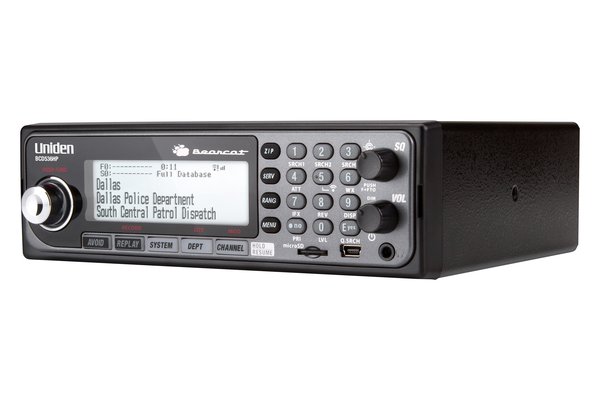
The BCD536HP is a mobile/base scanner sized for a single-DIN dash opening; Uniden gives 7.2 × 5.9 × 2.2 in and 54.3 oz. It shipped in January 2014 at a $599 suggested retail price. In the box: a USB cable, a 13.8 V / 750 mA AC adapter, a cigarette-lighter power cord, an installed 4 GB microSD card, the BC-WF1 Wi-Fi dongle, a mounting bracket, and a telescoping antenna. A DIN-E sleeve is an optional accessory.
Front panel:
- Display with adjustable backlight (Uniden lists a 64 × 288 dot-matrix panel) and a multicolor alert LED.
- Power/VOL/Light knob — turns the scanner on and sets volume; press to change backlight intensity; Func + VOL opens P25 Adjustment mode.
- SQ knob — squelch; press to toggle Close Call modes, press and hold for Close Call Only; Func + SQ starts Fire Tone-Out Standby Search.
- Scroll Control/Function — turn to move through menus, channels, systems, and searches; press for Function mode or to select.
- Keys including Avoid, Zip (enter a ZIP/postal code), Serv (service types), and Rang (range), plus the numeric keypad for Quick Keys and entry.
- microSD card slot — push the card in to release it; 4 GB supplied, up to 32 GB supported.
- Mini-USB port — PC connection for Sentinel, firmware, and database updates.
- Headphone jack.
Rear panel (per the labeled rear-panel photo in ../manuals/uniden-bcd536hp/RearPanel.jpg):
- BNC antenna jack — 50 Ω. Adapt to SMA for shared-handheld antennas, or use the BNC directly with a discone or NMO mag-mount via the matching connector.
- Ext. Speaker — 3.5 mm jack for an external speaker. Uniden notes that all BCD536HP audio output is Class-D (PWM) amplified: never connect the speaker or headphone jack to an external Class-D amplifier.
- Wi-Fi USB — a USB-A jack for the included Wi-Fi dongle.
- Serial port — a DB-9 RS-232 connector for an external NMEA GPS receiver (4800 bps default). There is no built-in GPS — nor on the SDS100 or SDS200.
- DC 11–16.6 V input jack, plus a 3-pin DC harness connector for vehicle wiring.
There is no audio line-out, discriminator output, or Ethernet port.
Wi-Fi: The BCD536HP does have Wi-Fi — through the included BC-WF1 dongle, with no PC required. Set it up at Menu → Wi-Fi Setup: Infrastructure mode joins your router; Access Point mode makes the scanner its own network for up to five devices. Phones, tablets, and PCs can then control the scanner (Uniden’s Siren app, or ProScan, which can also stream audio). Wi-Fi cannot update firmware or the database. Details in Vol 5 — Upgrades & Firmware.
Power: 11–16.6 V DC — the supplied 13.8 V adapter on the desk; in a vehicle, the DC harness or cigarette-lighter cord on a fused, ignition-switched feed.
Build quality: Solid plastic case, metal chassis internally. Knobs feel mechanically tight and have endured the decade-plus production run without notable failure modes. The most common service issue reported on the BCDx36HP family is the LCD ribbon-cable connector working loose after thousands of vibration cycles in vehicle use — symptom is intermittent display blanking; fix is opening the case and reseating the connector.
Comments (0)