Uniden SDS200 · Volume 3
Uniden SDS200 — Vol 3: Programming
Sibling of SDS100 with more output/inputs
3.1 Programming workflow
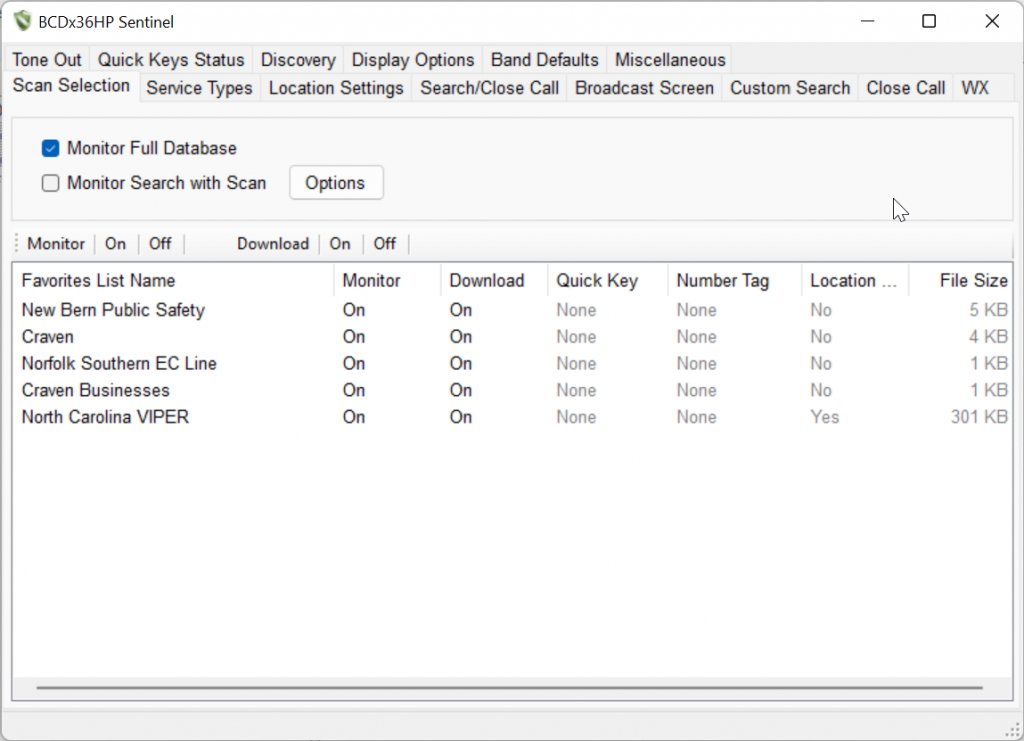
The programming workflow is identical to the SDS100 in every meaningful respect — same Sentinel software (free, Uniden), same ProScan power-user CPS (third-party, paid one-time), same favorites-file architecture (.HPE for the favorites collection, .HPS for individual systems, plus the RadioReference HPDB system database file), same RadioReference subscription model (~$10-15/yr for the database access ProScan and Sentinel need to import system definitions). Read Vol 13 §4 (Programming workflow) ↗ for the full treatment and **Vol 3 (Programming software landscape)** for the Sentinel/ProScan comparison and toolchain installation.
The workflow at a glance:
- Subscribe to RadioReference (one-time setup) — ~$15/yr; gives Sentinel/ProScan the credentials to pull current system definitions, frequency lists, and talkgroup mappings from the RadioReference database.
- Install Sentinel and/or ProScan on a Windows machine (Vol 3) — Sentinel is the official Uniden tool, free, sufficient for codeplug edit/write; ProScan is the third-party power-user CPS, ~$30 one-time, much better UI and adds Ethernet-control + advanced logging.
- Connect the radio over USB-B (front-panel USB-A is for thumb-drive firmware only, not for programming).
- Pull current codeplug from radio → host as a starting point.
- Use Sentinel’s “Get from Web” or ProScan’s RadioReference integration to pull system definitions for the local coverage area (county-by-county or system-by-system).
- Curate the favorites file — add desired systems, talkgroups, conventional channels, scan-list assignments, alert tones, GPS site mappings (for vehicle install), per-channel attributes.
- Write codeplug → radio.
- Save the codeplug snapshot to
../../programs/uniden-sds200/with a date-stamped filename for backup/recovery.
SDS200-specific addenda to the SDS100 workflow:
- Ethernet programming path. Once the radio is on the LAN with a static IP, ProScan can connect over Ethernet for codeplug pull/push/edit without the USB cable being attached. The Ethernet connection is faster than USB for large codeplugs (full favorites files can be tens of megabytes; Ethernet write is seconds, USB write is minutes). The configuration is in the radio’s menu under Settings → Network → IP Configuration; set a static IP outside the DHCP pool, set the gateway and DNS to match the LAN, and ProScan’s Connection dialog accepts an IP in place of the USB COM port.
- Master-codeplug discipline (cross-tool, see §5). Because the favorites-file format is identical between SDS100 and SDS200, a single curated
.HPEmaster file in../../programs/can be written to both radios from the same Sentinel/ProScan session. This is the single biggest operational benefit of owning both radios — codeplug curation cost is paid once, not twice. - USB thumb-drive firmware updates (the SDS100 has this too, but it’s especially useful on the SDS200 because a remote/installed unit might not have a convenient Sentinel-running PC nearby). Download the firmware payload from Uniden support, copy to a USB thumb drive, plug into the front-panel USB-A jack, follow the on-screen prompt. Lets you update firmware on a dash-installed or rack-installed unit without uninstalling.
3.2 Codeplug backups
The codeplug-backup discipline is the same as on the SDS100, and the file format is fully interchangeable — favorites files written from one radio import cleanly on the other.
Storage location: ../../programs/uniden-sds200/ — most recent backup: TBD (verify the current backup state; the directory may be sparsely populated until codeplug curation begins in earnest).
Cadence: Snapshot after every meaningful favorites-file edit (new system added, new talkgroup mappings, GPS site-mapping changes). The SD card carries the live config, so a separate SD-image backup (raw dd of the card to a .img file) is also worth keeping as a known-good full-state recovery point — the SD card occasionally corrupts (especially under heavy recording load), and a card-image restore is the fastest recovery path.
Restore: Sentinel reflash of the codeplug from the saved .HPE file, or — for full state recovery from the SD-card image — dd the saved image back to a fresh SD card and slot it in.
Cross-radio sharing — the master-codeplug discipline. Because the SDS100 and SDS200 share the same favorites-file format, the right operational pattern is to maintain one master codeplug per coverage area (e.g., master_home_2026-05-24.hpe, master_travel_eastern_2026-05-24.hpe) and write it to both radios from a single Sentinel/ProScan session. ProScan has explicit support for “write to multiple radios” workflows — connect both radios (one over USB-B, one over Ethernet, or both over USB-B sequentially), and the curated favorites file lands on both in one write cycle. This means: GPS site mappings, alert-tone curation, channel-attribute settings, scan-list discipline — all of it gets done once per codeplug-edit cycle, not twice. The cost saved over a year of incremental codeplug edits is substantial; the cognitive cost saved (not having to remember “did I push that edit to both radios?”) is even larger.
One asymmetry to know about. The SDS100 has internal GPS; the SDS200 does not (it needs an external dongle). The favorites file’s GPS-site-mapping data is the same on both radios, but the radio configuration for GPS enable/disable differs — on the SDS100, GPS is on by default in the radio’s settings; on the SDS200, GPS-source-selection needs to point at the external dongle. This is radio-side configuration, not codeplug content, so it doesn’t break codeplug sharing — but it’s a step in the SDS200’s first-time setup that doesn’t have an SDS100 analog.
Comments (0)