Uniden Homepatrol · Volume 4
Uniden Homepatrol — Vol 4: Reference
Load-by-location digital scanner, no per-channel programming
4.1 Tips and tricks
A handful of operating tips that are not obvious from the manual:
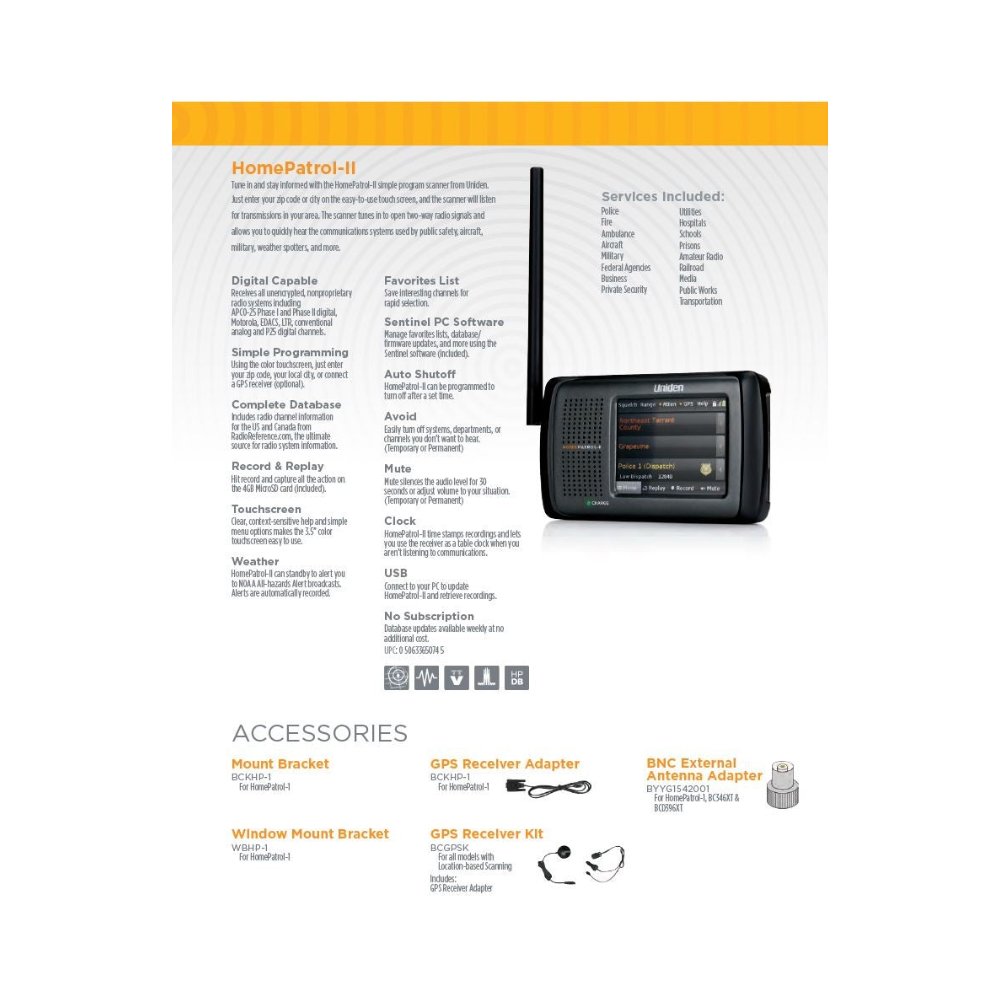
Hotel and vacation-rental scanning. The HomePatrol’s killer trick: load the ZIP of your destination before you leave, and you have working local public safety the moment you check in. For multi-city trips, pre-load a Quick-Key set for each destination and switch between them with a tap. No other scanner on the bench is this fast to repurpose for a new location.
Database refresh cadence. Every quarter is the practical minimum; monthly is better if you live in a metro area whose agencies churn frequencies and talkgroups. The RadioReference national database is updated continuously; the Sentinel pull is point-in-time. A 12-month-old snapshot will miss new Phase II migrations, retired Phase I systems, talkgroup renames, and new agency standups (a major hospital opening a new EMS frequency, for instance). Schedule a quarterly Sentinel session into the calendar.
Touchscreen calibration drift. After a few years of daily use the resistive touchscreen’s calibration drifts — the on-screen target and the actual touch-detection point diverge by 5-10 pixels at the screen edges. Run the calibration routine (settings → display → calibrate) every 6-12 months; carry a stylus or a soft-tipped pen for the high-traffic soft-key zones at the bottom of the screen if the fingernail-edge wear has become noticeable.
GPS auto-tune for road trips (either generation, with an accessory GPS receiver). Attach the GPS, set the auto-update radius to roughly 16 km (10 mi) for highway use or 8 km (5 mi) for dense-county urban driving, and let the scanner re-load systems as you cross county lines. The HomePatrol’s GPS handling is competent for the road-trip use case but not real-time enough for high-speed contesting; expect 15-20 seconds of scan-paused database query after each location change.
The “Easier” UI mode. The HomePatrol’s main menu has an “Easier” mode toggle that hides the deeper Quick-Key and favourites menus and presents only ZIP-code entry, scan, and pause. Useful when handing the radio to a non-technical visitor; equally useful when you want a distraction-free listening session and don’t want to be tempted into menu-spelunking. Toggle it back to “Normal” or “Expert” mode to expose the full feature set.
Headphone audio is louder and cleaner than the speaker. The internal speaker is treble-honky and prone to distortion at high volume; the headphone amp is significantly cleaner. For any extended listening session at a desk, headphones beat the speaker by a wide margin.
Recording and playback. The Quick-Record button (a soft key during scan) captures the current and immediately-preceding audio to the SD card as a WAV. Useful for catching the back-half of a dispatch you missed the first seconds of; the buffer reaches back ~30 seconds by default. Sentinel pulls these to the host PC for archival.
4.2 Resources
Manuals and documentation:
- HomePatrol-2 Owner’s Manual — Reference Library copy of Uniden’s July 2014 manual
- HomePatrol-1 Owner’s Manual (firmware 2.02 and later)
- HomePatrol Extreme Owner’s Manual — the separate guide to the paid Extreme features (written for the HP-1; the HP-2’s Extreme feature set is the same)
- HomePatrol Quick Reference Guide
- Every HomePatrol document in one list: Reference Library — HomePatrol
- Sentinel software user guide: bundled with the Sentinel installer; also at Uniden’s download page
- RadioReference HomePatrol-2 wiki article: https://wiki.radioreference.com/index.php/HomePatrol-2 — the community-maintained reference, more current than Uniden’s official documentation
- RadioReference HomePatrol-1 wiki article: https://wiki.radioreference.com/index.php/HomePatrol-1
Vendor and ecosystem:
- Uniden HomePatrol product page: https://www.uniden.com/products/homepatrol-2
- HomePatrol Sentinel download (free, Windows): HomePatrol Sentinel 2.03.02 (zip) · HomePatrol-2 download page · Uniden HomePatrol support pages
- Extreme upgrade purchase and key retrieval: my.uniden.com (register the scanner, then All My Scanners); feature list on Uniden’s Extreme page. There is no Phase II upgrade to buy — see Vol 5 — Upgrades & Firmware.
- RadioReference — the source of the HomePatrol database; browsing is free, and no subscription is needed for the HomePatrol’s weekly database updates: https://www.radioreference.com
Cross-references within this series:
- Upgrades, firmware updates, and the Extreme unlock: Vol 5 — Upgrades & Firmware
- Series overview and per-radio template: Vol 1
- SDS100 (flagship handheld scanner — modern Phase II + DMR/NXDN; the upgrade path from HomePatrol when ZIP-code-loading is no longer the dominant requirement): Vol 13
- BCD536HP (mid-tier mobile/base scanner — same Sentinel pipeline, deeper menus, faster scan rate, full Quick-Key system; the technical-sibling scanner of choice when you want more than appliance behaviour): Vol 15 (BCD536HP)
- Programming software landscape — Sentinel deep treatment: Vol 3
- Frequency planning and license envelope — receive-only legality, ECPA §2511 boundary: Vol 4
Cross-references into the sibling Antennas deep dive:
- Mobile / portable antenna selection: Antennas Vol 9 (Portable & mobile monopoles)
- Outdoor wideband base antenna (the recommended discone upgrade): Antennas Vol 12 (Discone & wideband)
- Per-radio antenna pairing matrix: Antennas Vol 29 (Use-case matrix)
Community forums:
- RadioReference forum, Uniden Scanners section: https://forums.radioreference.com/forums/uniden-scanners.31/
- The HomePatrol section of the Uniden support forum (legacy threads with historical firmware-update notes)
Comments (0)