Uniden BCD396XT · Volume 1
Uniden BCD396XT — Vol 1: Introduction & Hardware
P25 Phase I DynamicDMA handheld
1.1 About this volume
The Uniden BCD396XT is the mid-tier handheld digital scanner — the flagship handheld of the BCDx96XT generation (released in 2009), the bench’s daily-driver handheld for the better part of a decade before the SDS100 redefined the category in 2018. It is a heterodyne-architecture scanner (vs the SDS100’s True I/Q receiver) that covers a well-defined use space: P25 Phase I (conventional, trunked, and one-frequency trunking), EDACS Wide / Narrow / SCAT (no ProVoice), Motorola Type I/II, LTR, and conventional AM/FM/NFM/WFM RX from 25-512 MHz, 758-824, 849-869, 894-960, and 1240-1300 MHz with the usual cellular and milair gaps notched out by 47 CFR §15.121.
The architecture matters for posture. The 396XT is a narrowband superhet — it demodulates one signal at a time and lacks the SDS100’s True I/Q ability to capture the RF passband for software demodulation. In practice: (1) no I/Q recording of the air — what you hear is what you get; (2) P25 simulcast (LSM) sites are harder going than on the SDS100, although the final firmware (1.11.01) specifically improved LSM performance; (3) no P25 Phase II, DMR, NXDN, or ProVoice — and no upgrade adds any of them. Those modes arrived in later Uniden models (the BCDx36HP family has Phase II built in and DMR, NXDN, and ProVoice as paid keys).
So why is it still on the bench? Three reasons. First, it’s a proven, well-broken-in unit — codeplug tuning accumulated over years of use means the favorites lists, quick-key assignments, and channel-group structure are already optimized for the local RF environment. Re-doing that work on a different radio is a multi-day investment. Second, it’s the fallback when the SDS100 is being reprogrammed, its battery is charging, or its firmware update is in progress — scanning doesn’t stop just because the flagship is on the bench. Third, the 396XT is field-rugged in a way the SDS100 is not — the SDS100 is only splash-rated (IPX4) and its color LCD and screw-down battery cover are weaker points; the 396XT’s monochrome LCD and AA-cell battery compartment have survived a decade of rough handling.
The subject is the 396XT as it sits in the bench today, 17 years after its 2009 introduction. Uniden’s support pages for it are still online, though its last firmware release was in 2013 and it has no Sentinel or database-download support — it is programmed with FreeScan, ProScan, or ARC XT (see Vol 5 — Upgrades & Firmware). Cross-link to Vol 13 (SDS100) for the flagship handheld that supersedes the 396XT in capability (True I/Q receiver, P25 Phase II, DMR/NXDN keys, color display); cross-link to Vol 15 (BCD536HP) for the contemporary mid-tier base/mobile sibling; cross-link to Vol 17 (BC246T) for the legacy analog handheld this radio replaced. Programming software treatment lives in Vol 3.
1.2 Hardware tour
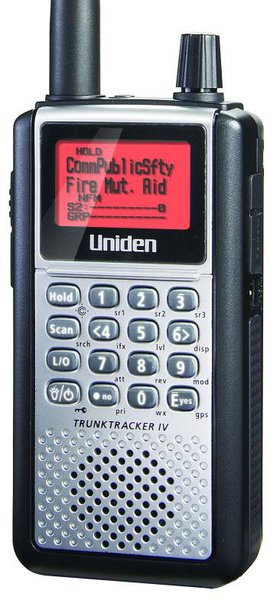
Uniden’s specifications give the 396XT as 2.40 × 1.22 × 5.35 in (W × D × H, without antenna) and 0.37 lb without batteries or antenna. The form factor reads more “commercial HT” than “SDS100” — square corners, belt clip, dot-matrix LCD, and a scroll control on top alongside the SMA antenna jack. It was released in the last week of March 2009.
Display. A 64 × 128 full dot-matrix LCD with a multi-color backlight — selectable white, red, magenta, blue, green, cyan, or yellow, at three brightness levels; the keypad backlight is white. The display shows the active system / group / channel / talkgroup name on most modes, with signal-strength and status icons at top.
Controls. Per Uniden’s reference: a scroll control on top (turn to move through menus and channels; press to select), a Light/Power/Key Lock key (press for the backlight, press and hold to turn the scanner on or off, Function plus this key to lock the keypad), a Function shift key, and the 0-9 keys, which toggle System, Site, and Search Quick Keys during scan and enter numbers. Other keys include Hold (also Close Call), L/O (lockout), Menu, E/yes/gps, and ./no/pri. A Key Safe mode keeps novice users from changing settings.
Audio. A small front speaker, plus a 3.5 mm stereo phone jack for headphones or an amplified external speaker. Audio AGC evens out the volume between signals.
Battery. Three AA cells. Uniden supplies 2300 mAh Ni-MH rechargeables, and alkalines also work. A switch in the battery compartment selects Ni-MH or ALKALINE — set it correctly, and never leave alkalines installed with the switch on Ni-MH. The scanner charges installed Ni-MH cells only from its AC adapter (6 V DC, 800 mA, center-positive), while the scanner is turned off; the charge time is adjustable in the menu. It does not charge over USB.
The AA-cell architecture is one of the 396XT’s underappreciated strengths: when the cells run down on a deployment, you swap in fresh AAs from a gas station, a hardware store, or the kitchen drawer. The SDS100’s proprietary Li-ion pack has no such fallback — if you forgot the charger, you’re done.
Antenna jack. SMA-female on the top. The stock antenna is a stubby wideband rubber duck — adequate for in-pocket carry but a measurable signal loss versus the popular wideband upgrades (see the Operations volume). SMA-to-BNC adapters let it use BNC-terminated antennas and feedlines.
PC and GPS jack — there is no USB port. Programming, PC control, firmware updates, GPS, and wired cloning all go through one 4-pin mini GPS/Remote Interface jack. For a PC, Uniden’s USB-1 cable (a USB-to-serial adapter with a Prolific PL2303 chip) plugs into that jack; Uniden supports only the USB-1. A GPS receiver must have an RS-232 serial NMEA-0183 output — USB GPS units are not compatible — and wired cloning copies everything from one 396XT to another over a serial cable. Programming and firmware details are in the Programming volume and Vol 5 — Upgrades & Firmware.
Memory. Up to 25,000 dynamically allocated channels and 500 systems, held in internal memory (there is no SD card). The “dynamic” part is the key architectural difference from the BC246T-era scanners — systems consume only the memory they need, and the menu reports the percentage used. If memory is ever corrupted (“Memory Error”), Uniden’s reset is to hold 2 + 9 + Hold while turning the scanner on, which erases all programming.
Weather resistance. Not weatherized. Outdoor use in rain calls for a holster or pouch.
Comments (0)