Scanners & Radios · Volume 13
Uniden BCD396XT
Mid-tier handheld digital scanner — P25 Phase II, ProVoice option, AmbeXT vocoder
Contents
| Section | Topic |
|---|---|
| 1 | About this volume |
| 2 | Hardware tour |
| 3 | Operating modes |
| 4 | Programming workflow |
| 5 | Codeplug backups |
| 6 | Field use |
| 7 | Tips and tricks |
| 8 | Resources |
1. About this volume
The Uniden BCD396XT is the mid-tier handheld digital scanner — the flagship handheld of the BCDx96XT generation (introduced 2010), the bench’s daily-driver handheld for the better part of a decade before the SDS100 redefined the category in 2018. It is a heterodyne-architecture scanner (vs the SDS100’s TrueIQ baseband SDR) that nevertheless covers the same use space competently: P25 Phase I + Phase II, EDACS Standard / Narrow / ProVoice (option), Motorola Type I/II/IIi, LTR Standard, X2-TDMA, and conventional AM/FM/NFM/WFM RX from 25-512 MHz, 758-824, 849-869, 894-960, and 1240-1300 MHz with the usual cellular and milair gaps notched out by 47 CFR §15.121.
The architecture matters for posture. The 396XT is a narrowband superhet with a fixed IF chain and an AmbeXT vocoder ASIC for AMBE+2 voice decoding — meaning it can only decode one signal at a time, can only watch one talkgroup’s transmissions on a trunked system, and lacks the SDS100’s TrueIQ ability to capture the whole RF passband to baseband for software-defined demodulation. In practice this means three concrete limitations: (1) no “I/Q recording” of the air — what you hear is what you get; (2) no LSM (Linear Simulcast Modulation) auto-detection, so it can struggle in dense simulcast P25 deployments where the SDS100 thrives; (3) no DMR or NXDN decode — those entered the Uniden line with the BCDx36HP generation (2013) and BCDx96P2 (2014).
So why is it still on the bench? Three reasons. First, it’s a proven, well-broken-in unit — codeplug tuning accumulated over years of use means the favorites lists, quick-key assignments, and channel-group structure are already optimized for the local RF environment. Re-doing that work on a different radio is a multi-day investment. Second, it’s the fallback when the SDS100 is being reprogrammed, its battery is charging, or its firmware update is in progress — scanning doesn’t stop just because the flagship is on the bench. Third, the 396XT is field-rugged in a way the SDS100 is not — the SDS100 is splash-rated (IPX5/IPX4) but its color touchscreen and battery door are weaker points; the 396XT’s monochrome LCD and AA-cell battery compartment have survived a decade of rough handling.
This volume covers the 396XT as it sits in the bench today, 16 years after its 2010 introduction. The Uniden product page is dated but the radio is still supported by Sentinel database updates as of 2025 — RadioReference programming flows still publish 396XT-format favorite lists. Cross-link to Vol 10 (SDS100) for the flagship handheld that supersedes the 396XT in capability (TrueIQ baseband, DMR/NXDN, color touchscreen, GPS); cross-link to Vol 12 (BCD536HP) for the contemporary mid-tier base/mobile sibling; cross-link to Vol 14 (BC246T) for the legacy analog handheld this radio replaced. Programming software treatment lives in Vol 21.
2. Hardware tour
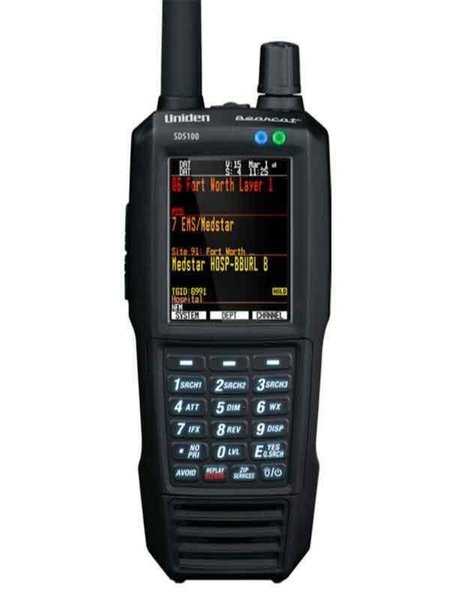
The 396XT is a compact handheld — roughly 60 × 130 × 35 mm (W × H × D) excluding antenna, ~250 g with battery. The form factor reads more “1990s commercial HT” than “2018 SDS100” — square corners, side belt clip, monochrome LCD, mechanical rotary knob on top alongside the SMA antenna jack.
Display. A 64 × 128 pixel monochrome backlit LCD with selectable orange (amber) or blue (cyan) backlight color. The backlight is a soft LED, not bright by modern standards but readable in direct sunlight (a strength the SDS100 color TFT does not match). Eight lines of text at default font; user-selectable font size. The display shows the active system / department / channel / talkgroup name on most modes, with signal-strength bargraph and squelch indicator at top.
Controls. Top-deck rotary knob (push-to-select, rotate for menu navigation and frequency tuning in manual mode), 4-position D-pad on the keypad area, dedicated Function (FUNC) shift key, 0-9 numeric keypad with the standard scanner-keypad overload (each numeric key doubles as a Quick-Key for the trunked-system / channel-group enable/disable toggle), Scan / Hold / Avoid / Search / Menu function keys, and a dedicated Light/Power button. The push-to-talk-equivalent for a scanner is the Hold key — it freezes the radio on a specific channel for sustained listening.
Audio. Front-firing speaker behind a circular grille; the speaker is small (~25 mm) and the audio is acceptable but not loud — a known weakness vs the BCDx36HP generation. A 3.5 mm TRS jack on the top deck accepts headphones or an external amplified speaker; the same jack is used for the optional remote-head accessory cable. Audio output via headphone jack is mono.
Battery. Four AA cells in a removable cartridge — NiMH (rechargeable, the BP296 pack is Uniden’s labeled BP for ~1300 mAh eneloop-class cells) or alkaline (lower runtime, no internal charging). The radio charges NiMH cells in-place when connected to the USB programming cable or to the BC150 AC adapter (12 V DC at the back of the unit through a barrel jack — TBD verify exact connector for Jeff’s specific unit). Field runtime is ~6-8 hours on a fresh charge of 4× eneloop AA at typical scanning duty cycle; alkaline AAs give ~4-5 hours and shouldn’t be charged in-place (the radio’s charging circuit assumes NiMH chemistry — leaving alkalines installed with charge enabled is a leak risk).
The AA-cell architecture is one of the 396XT’s underappreciated strengths: when the battery cartridge dies on a deployment, you swap to fresh AAs from a gas station, a hardware store, or the kitchen drawer. The SDS100’s proprietary BP9 Li-ion pack has no such fallback — if you forgot the charger, you’re done. The 396XT will keep scanning as long as the AA supply chain holds, which is forever.
Antenna jack. SMA-female on the top deck. The stock antenna is a stubby ~75 mm wideband rubber duck — adequate for in-pocket carry but a measurable signal loss vs any of the popular wideband upgrades (see §6). The SMA jack accepts the standard 50 Ω SMA-male antennas; SMA-to-BNC pigtails are the standard accessory if the operator wants to use a BNC-equipped scanner antenna or a BNC-terminated discone feedline.
Programming jack. Mini-USB-B on the side, behind a rubber flap. Appears as a USB-Serial device to the host PC when connected — the underlying chip is a Prolific PL-2303HX or compatible (TBD verify driver class — Windows 10/11 should auto-enumerate; Windows 7-era systems sometimes need Uniden’s driver bundle from the Sentinel install). Programming flow described in §4.
Memory. ~25,000 dynamically-allocated channels organized into systems → sites → groups → channels. The “dynamic” part is the key architectural difference from the BC246T-era scanners — the 396XT does not pre-partition memory into fixed banks of N channels; instead, systems consume only the memory they need, and the radio reports remaining capacity as systems are added.
IPX rating. Not weatherized. The 396XT is splash-tolerant but not splash-rated; outdoor use in rain calls for a holster or pouch.
3. Operating modes
The 396XT covers the full Uniden mid-tier digital-scanner feature set as of its 2010 introduction. The notable omissions vs the SDS100 generation: no DMR, no NXDN, no TrueIQ baseband demodulation, no LSM (Linear Simulcast Modulation) auto-detection.
Conventional analog modes.
- FM — narrowband (12.5 kHz spaced) and standard (25 kHz) — the workhorse for VHF/UHF business band, public-safety analog repeaters, and amateur 2 m / 70 cm.
- AM — for the aircraft band (118-137 MHz civil aviation), CB (27 MHz), and the military 225-380 MHz milair band (subject to the §15.121 carve-outs).
- NFM — explicitly narrow FM (typically 11 kHz deviation) for newer narrowband-mandated business-band channels.
- WFM — wideband FM for the broadcast FM band (88-108 MHz) — included for completeness; few people scan broadcast FM but the option is there.
Trunked digital and analog modes.
- Motorola Type I, Type II, Type IIi-Hybrid — the legacy analog Motorola SmartZone trunking system. Mostly historical now; some legacy public-safety still runs it.
- EDACS Standard / Narrow / ProVoice — Ericsson / GE / Harris trunking. ProVoice is the optional paid firmware upgrade (one-time license per radio serial number, ~$60-70 USD mid-2026; verify current pricing with Uniden). ProVoice decode is necessary for EDACS systems that have transitioned from analog voice to ProVoice digital voice — predominantly legacy state/county public-safety in the eastern US.
- LTR Standard — Logic Trunked Radio. A simpler trunking protocol than the Motorola or EDACS families; common in commercial fleet operations (taxis, towing, utility companies).
- P25 Phase I (FDMA) — APCO Project 25 single-time-slot. The dominant modern public-safety voice format. The 396XT’s AmbeXT ASIC decodes the AMBE+2 vocoder cleanly.
- P25 Phase II (TDMA) — two-slot TDMA on the same 12.5 kHz channel, doubling spectrum efficiency. The 396XT was originally Phase I only at introduction; Phase II support was added as a firmware upgrade during the 2011-2013 timeframe — verify the radio’s firmware version is current (see §4) for Phase II capability. Phase II is now the dominant flavor of P25 in modern public-safety deployments.
- X2-TDMA — Motorola’s pre-standard TDMA precursor to P25 Phase II. Some legacy installations still on the air.
AmbeXT vocoder. This is the AMBE+2 voice decoder ASIC at the heart of the 396XT’s P25 and EDACS ProVoice decoding capability. The chip is licensed from Digital Voice Systems Inc. (DVSI) and is the same vocoder family used in commercial P25 subscriber units. Audio quality on a clean signal is indistinguishable from a commercial Motorola APX or Harris XG-25 portable; on a weak or fading signal, AMBE+2’s characteristic “warbling” / “bubbling” artifacts appear before the audio drops out completely.
No DMR, no NXDN. Worth restating because it is the single most common reason an operator outgrows the 396XT: it cannot decode DMR (Mototrbo, Hytera, amateur DMR, public-safety DMR migration deployments) or NXDN (Kenwood NEXEDGE, Icom IDAS, public-safety NXDN). For those modes, the SDS100 or BCDx36HP-class radios are necessary. As of 2026, the public-safety DMR migration in most US regions is still modest — P25 remains dominant — so for typical public-safety scanning the 396XT remains useful. In regions where the local utility or transit DMR network is the active monitoring target, the 396XT is a non-starter.
No LSM auto-detect. Linear Simulcast Modulation is a P25 transmission variant used in dense multi-site simulcast networks (multiple transmitters on the same frequency, geographically distributed, fed from a common controller). The SDS100’s TrueIQ baseband demodulator can software-detect and decode LSM; the 396XT’s fixed-IF chain cannot. Practical effect: in a metro area with a multi-site simulcast P25 network, the 396XT may have audible distortion or dropouts that the SDS100 handles cleanly. In a smaller metro / rural area with single-transmitter sites, no LSM effects appear and the 396XT performs equivalently.
Discovery and Service Search. The 396XT has the standard Uniden Service Search feature (pre-populated frequency ranges for public-safety / aviation / marine / amateur / business band) and a custom Search mode for arbitrary frequency ranges. It does not have the SDS100’s Discovery mode (which automatically logs new active frequencies in a custom range to SD card with timestamp and signal strength) — Search on the 396XT is a manual exploration tool.
4. Programming workflow
The 396XT’s programming workflow is mature, well-documented in the community, and well-served by free third-party software. The radio itself supports manual channel entry from the keypad (tedious but always available); for any serious codeplug work, the host-software flow is the way.
Connection. USB programming cable, mini-USB-B to USB-A. Generic mini-USB cables work; the radio enumerates as a USB-Serial COM port on Windows. The default Prolific or FTDI driver from Windows Update typically handles it; if the COM port doesn’t appear, the Sentinel install bundle includes the Uniden-blessed driver. Find the assigned COM number in Device Manager → Ports (COM & LPT).
Software options.
| Software | Cost | OS | Strength | Weakness |
|---|---|---|---|---|
| Uniden CPS (official) | Free | Windows | Vendor-blessed, exact factory format | Dated UI (2010-vintage); slow database imports; clunky workflow |
| FreeScan | Free | Windows | Active community development; clean import from RadioReference; the practical choice for 396XT-family programming | Third-party — Uniden offers no support |
| ProScan | Paid (~$50 USD mid-2026) | Windows | Polished UI; live monitoring + recording; preferred by power users | Cost; license per-PC |
| ARC396 (BuTel) | Paid (~$30 USD mid-2026) | Windows | European-favored alternative; good for AnalogClintonAndShiawassee-type spreadsheet-driven workflows | Less community traction than FreeScan in North America |
For the 396XT specifically, FreeScan is the practical choice. It is actively maintained as of 2025, imports RadioReference data exports directly, and writes a clean .396XT codeplug that the radio loads without fuss. The deep treatment of FreeScan (including the RadioReference subscription flow, the import wizard, the favorite-list editing model, and the upload sequence) lives in Vol 21.
Manual programming reference. The HTML manual extracted from the community-published “Easier to Read” manual lives at ../manuals/uniden-bcd396xt/manual-html-files/ and is the load-bearing keystroke reference for any operation done at the keypad — adding a single channel, editing a quick-key assignment, manually configuring a P25 system, etc. The community-published version is markedly more usable than the Uniden-shipped PDF (which is the same content rearranged into a dense reference format optimized for legal compliance rather than operator workflow). When in the field and the laptop is at home, the keypad-driven workflow with the HTML manual on a phone screen is the fallback.
Codeplug format. The 396XT writes and reads the .396XT extension (technically .396XT is the FreeScan convention; Uniden’s own CPS uses .HPE for some files in the same family — verify by inspection if Jeff’s archive has mixed formats). Underneath, the file is a structured binary; FreeScan exposes the content as an editable tree (systems → sites → groups → channels) with import/export to CSV for bulk editing in a spreadsheet.
Note on the older .996 format. The radio’s predecessors (BC796D, BC796T, BC246T) wrote a .996 codeplug format. Jeff has at least two .996 files in programs/uniden-misc/ (AnalogClintonAndShiawassee.996, ClintonAndShiawassee.996) likely targeting that older family. These files are not directly loadable into the 396XT — the underlying memory model changed when the 396XT moved to dynamic memory allocation. FreeScan and some third-party tools can convert the .996 content into a 396XT-compatible format by re-mapping the fixed-bank channel layout into dynamic systems / groups; the conversion is lossy (some metadata doesn’t translate) but produces a working starting point. See §7 for the migration approach.
Firmware updates. Uniden’s firmware-update tool is a separate Windows utility (BC396XT_FirmwareUpdate.exe or similar — verify the exact name in the Sentinel install bundle, TBD). The 396XT was originally shipped with P25 Phase I only; Phase II support, the AmbeXT vocoder firmware revisions, and bug fixes have been issued in batches through ~2019. Confirm the radio is running the latest published firmware before any serious deployment — particularly if the radio has been in storage for years. The version is reported in the radio’s Settings menu under “About” or “Version” (TBD verify menu path).
5. Codeplug backups
Codeplug files. Jeff’s archive of 396XT codeplugs lives at ../../programs/uniden-bcd396xt/. Most recent backup: TBD — flag for verification with Jeff which codeplug is the current bench reference. The archive should be append-only — never delete an old codeplug, since “I want to restore the configuration from before the firmware update broke X” is exactly the recovery scenario that a versioned codeplug archive solves.
Legacy .996 files. As noted in §4, Jeff has AnalogClintonAndShiawassee.996 and ClintonAndShiawassee.996 in programs/uniden-misc/. These targeting the BC246T-era family (cross-link to Vol 14) and not the 396XT directly. Their value for the 396XT is as a source of frequencies — the Clinton County and Shiawassee County (Michigan) public-safety frequencies they contain can be migrated forward via FreeScan’s .996-import or by manual re-entry into a fresh 396XT codeplug.
Backup cadence.
- After every codeplug edit (new system added, quick-key assignment changed, channel group reorganized).
- Before any firmware update — firmware updates do not erase user codeplug data, but the recovery scenario is “the update partially completed and the radio is now misbehaving” — having a known-good codeplug to restore to is the recovery path.
- Before any long deployment — taking the codeplug archive on a thumb drive into the field means a corrupted codeplug can be re-flashed in 5 minutes.
Restore procedure. Connect cable → FreeScan → File → Open → select .396XT → Radio → Upload to Radio. The radio reboots after upload; the new codeplug is active immediately. The whole cycle is ~2-3 minutes for a typical codeplug (~50-100 systems).
Naming convention. The recommended filename pattern is bcd396xt-YYYY-MM-DD-{context}.396XT — date stamps the snapshot, context disambiguates (daily-driver, road-trip-michigan, field-day-2026, etc.). This matches the per-radio codeplug naming used elsewhere in the project (Vol 1 §6) and makes the archive self-documenting under ls -lt.
6. Field use
Antenna pairing. The stock 75 mm wideband rubber duck is fine for in-pocket carry but loses 6-10 dB vs any of the popular wideband whip upgrades — significant in a marginal-signal scenario. Three recommendations from the antenna deep dive:
- Nagoya NA-771 or equivalent ~390 mm dual-band whip — the budget upgrade ($20-25 USD mid-2026). Optimized for 2 m / 70 cm amateur work but performs acceptably across the full scanner range with the SWR mismatch hidden by the radio’s input matching. See Antennas Vol 9 (Portable & Mobile Monopoles) for the geometry and the budget-vs-premium decision.
- Diamond RH-771 or Smiley 270 — premium dual-band whips, ~$45-60 USD; mechanically tougher and slightly better-tuned across the broad scanner range. Recommended for any operator who carries the radio outdoors regularly.
- Outdoor discone (Diamond D-130J, Comet DS-150S) — when the 396XT is base-station deployed (cradle on the desk, USB power, SMA-to-N pigtail to a roof-mounted discone). See Antennas Vol 12 (Discone & Wideband Antennas) for the discone geometry and frequency-coverage tradeoffs; Antennas Vol 29 (Use-case Matrix) has explicit per-radio antenna recommendations including the 396XT.
The antenna-pairing logic for a wideband scanner is asymmetric: a discone outperforms a single-band optimized antenna because the scanner’s listening band is the full 25-1300 MHz range, not any single narrow slice. The mediocre-across-all-bands tradeoff of the discone is exactly the right tradeoff for the scanner posture.
Posture. The 396XT is the second-pocket scanner in the field — SDS100 in one pocket as the primary, 396XT in the other as the long-running backup when the SDS100 battery is depleting. With 4× eneloop AA and the backlight tuned down, the 396XT runs 6-8 hours of typical-duty scanning; the SDS100 runs 8-12 hours but recharges from a USB-C powerbank, whereas the 396XT recharges by simply swapping in another set of charged AA cells from a pouch. The asymmetry favors the 396XT for sustained multi-day deployments where USB power is not assured.
Charging. The 396XT charges the installed NiMH cells in-place when USB-powered from a phone-class 5 V supply (the cable is mini-USB-B, so any USB-A to mini-USB cable works). Charge time from depleted is ~6-8 hours at the default trickle rate — slow by modern standards, but the trade is cell longevity (the trickle charge profile is gentle on eneloop chemistry). For faster turnaround, swap to externally-charged eneloops; an external smart charger (La Crosse BC-1000 or equivalent) cycles a fresh set in 1-2 hours at a higher current.
RF environment considerations. In a dense urban RF environment the 396XT’s narrowband superhet front-end can be desensitized by strong nearby signals — broadcast FM (88-108 MHz at potentially +20 to +40 dBm at close range from a tall tower), cellular base stations (700-900 MHz, 1700-2100 MHz), and pager transmitters can all couple through the antenna and reduce the radio’s sensitivity on the target band. The SDS100’s filtered front-end handles this slightly better. The mitigation is an antenna with frequency-selective response (discone is broad but doesn’t peak at the offending bands) or, in extreme cases, an external bandpass preselector — though the latter is rarely worth the complexity for casual scanning.
Cross-reference to amateur use. Jeff holds FCC Amateur Extra-class — the 396XT can monitor amateur 2 m (144-148 MHz) and 70 cm (420-450 MHz) FM repeaters and simplex channels in the routine scanning workflow. This is purely receive — the 396XT cannot transmit. For amateur TX, see Vol 2 (VX-8DR), Vol 3 (Baofeng F8HP), or Vol 5 (AnyTone D878UVII). The 396XT is a useful monitor-while-operating tool — leave it on a local repeater’s TG list while transmitting from the AnyTone on the same band; the duplex separation means the 396XT receives normally while the TX radio is keyed.
7. Tips and tricks
Quick-Keys 0-9 are the muscle-memory feature. Each numeric key on the keypad doubles as a Quick-Key for a system or channel-group on/off toggle. With FreeScan, assign Quick-Keys to the systems / groups that matter most — e.g., Quick-Key 1 = “Lansing PD”, Quick-Key 2 = “MSU Police”, Quick-Key 3 = “Local fire dispatch”, Quick-Key 4 = “Amateur 2m repeater favorites”, etc. Then in the field, pressing FUNC + 1 enables/disables the entire Lansing PD system without menu diving. The Quick-Key model is one of the 396XT’s strongest operational ergonomics — once configured, the radio reconfigures faster than any menu-driven scanner. The SDS100 has a similar feature but Quick-Key muscle memory developed on the 396XT carries over directly.
AmbeXT decode quality is the underrated strength. The AmbeXT vocoder ASIC in the 396XT handles APCO-25 voice cleanly — on a clean P25 signal, the audio is indistinguishable from a commercial Motorola APX subscriber unit. The “warbling” / “robotic” P25 audio quality that some operators complain about is almost always a weak-signal or simulcast-interference artifact, not a vocoder limitation. If P25 audio sounds bad on the 396XT in a strong-signal scenario, the suspect is the antenna or the system’s network audio quality (the dispatch console, not the radio).
ProVoice activation is one-time per radio. The EDACS ProVoice upgrade is a paid activation code keyed to the radio’s serial number (~$60-70 USD mid-2026; verify current pricing at https://upgrade.uniden.com or equivalent — TBD verify URL is still active). The code is entered through a menu sequence on the radio and persists across firmware updates. If Jeff’s bench includes an EDACS ProVoice coverage area in monitoring scope, activation is a one-time investment that unlocks a capability nothing else in the bench can do without a similar paid unlock on the SDS100 ($60-70 USD again). If the bench is monitoring only P25 / EDACS-Standard / conventional, ProVoice is unnecessary.
.996 → .396XT codeplug migration. Jeff’s AnalogClintonAndShiawassee.996 and ClintonAndShiawassee.996 (in programs/uniden-misc/) can be brought forward into the 396XT codeplug. The path: open the .996 in FreeScan → use FreeScan’s “Convert/Import” feature (in Tools menu — TBD verify exact menu label) → save as .396XT → review the conversion (the dynamic-memory model means the old fixed banks become dynamic systems; metadata such as service-type tags may need re-tagging) → upload to radio. The frequencies and CTCSS/DCS tones transfer cleanly; channel-group memberships may need reorganization. For radios with extensive .996 history, an alternate path is to export the .996 to CSV, hand-curate in a spreadsheet, then import the cleaned CSV into a fresh 396XT codeplug — slower but produces a cleaner result.
Backlight color matters at night. The selectable orange or blue backlight is not just cosmetic — the orange backlight preserves night vision substantially better than blue. For overnight monitoring (e.g., on a portable deployment where the radio sits on a nightstand), set the backlight to orange and tune the brightness down to ~25-30%. Blue backlight at the same brightness wrecks dark adaptation in ~10 seconds.
Sentinel still supports the 396XT for database updates. As of 2025, Uniden’s Sentinel database updates still publish the 396XT-compatible frequency database — the radio is not abandoned. Quarterly updates capture new public-safety system migrations (talkgroup changes, new sites, frequency reassignments). The update flow: connect cable → Sentinel → Update Database → push to radio. Five minutes, no codeplug changes needed; the database is independent of the user’s favorites configuration.
Manual frequency-lookup is faster than you think. The keypad-driven workflow for “find the frequency for a specific PL/CTCSS tone or DCS code I just heard” is well-supported on the 396XT — Search mode with the CTCSS/DCS Search option enabled scans for the tone in seconds. Useful when chasing an unknown channel that another radio just keyed; faster than booting a laptop and querying RadioReference.
Hold-key discipline. The Hold key freezes the radio on the currently-decoded channel; pressing it again resumes scan. New operators chronically forget Hold is enabled and wonder why the radio isn’t scanning. The display shows “HOLD” in the top bar when active — make a habit of glancing there before troubleshooting “the scanner isn’t picking anything up”.
8. Resources
Manuals (local archive).
- HTML manual (community “Easier to Read” version, extracted):
../manuals/uniden-bcd396xt/manual-html-files/ - Original Uniden PDF manual:
../manuals/uniden-bcd396xt/(TBD verify exact filename — typicallyBCD396XT_OM.pdforBCD396XT_OwnersManual.pdf)
Uniden official resources.
- Uniden BCD396XT product page (legacy, still live as of 2025): https://www.uniden.com/products/bcd396xt (TBD verify URL — Uniden has reorganized their product page structure several times)
- Uniden support / Sentinel downloads: https://www.uniden.com/support
- Uniden upgrade portal (ProVoice activation codes): https://upgrade.uniden.com (TBD verify still active)
Third-party programming software.
- FreeScan (the practical choice for 396XT-family programming): https://freescansoftware.com (TBD verify URL — community-distributed, exact home page has moved across hosts; search “FreeScan Mark Smith BCD396XT” for current canonical link)
- ProScan: https://www.proscan.org
- ARC396 (BuTel): https://www.butel.nl
Community references.
- RadioReference BCD396XT wiki: https://wiki.radioreference.com/index.php/BCD396XT
- RadioReference database (system / talkgroup / frequency source): https://www.radioreference.com (subscription required for downloadable exports; free for browse)
- RadioReference forums, Uniden Forum: https://forums.radioreference.com/forums/uniden-forums.86/ (TBD verify URL)
- The Scanner Master community: https://www.scannermaster.com
Sibling volumes in this project.
- Vol 1 (Overview & decision graph) — the navigator; positions the 396XT in the full lineup.
- Vol 10 (Uniden SDS100) — the flagship handheld that supersedes the 396XT (TrueIQ baseband, DMR/NXDN, color touch).
- Vol 11 (Uniden SDS200) — base/mobile SDS counterpart.
- Vol 12 (Uniden BCD536HP) — contemporary mid-tier base/mobile sibling (DMR/NXDN capable, the 396XT’s “what I would have bought if I needed DMR” alternative).
- Vol 14 (Uniden BC246T) — the legacy analog handheld this radio replaced; the
.996codeplug source. - Vol 21 (Programming software landscape) — FreeScan, ProScan, Sentinel, ARC396 deep treatment.
Sibling Hack Tools cross-references.
- Antennas Vol 9 (Portable & Mobile Monopoles) — the NA-771 / Diamond RH-771 / Smiley 270 deep treatment.
- Antennas Vol 12 (Discone & Wideband Antennas) — discone geometry and frequency-coverage tradeoffs for base-station scanner deployment.
- Antennas Vol 29 (Use-case Matrix) — explicit per-radio antenna recommendations including the 396XT.