Uniden Homepatrol · Volume 1
Uniden Homepatrol — Vol 1: Introduction & Hardware
Load-by-location digital scanner, no per-channel programming
1.1 About this volume
The Uniden HomePatrol is the scanner that bet, in 2010, that the operator’s problem was no longer can the radio decode the system but can the operator find the systems worth decoding. By that time the trunked-system landscape had reached a complexity at which the average user was looking at a multi-day learning curve before hearing a single dispatch — RadioReference databases existed, programming software existed, but stitching them together into a working scan list required vocabulary (talkgroup, control channel, NAC, edge frequency, simulcast cell) that the bench-engineer crowd took for granted and the casual user did not have. Uniden’s answer was a scanner with the RadioReference database on board, loaded by location: enter a ZIP code or a county name and the radio queried its own SQLite-style snapshot, identified every public-safety system serving that area, and built a working scan list automatically. No programming software required for the basic case. The scanner became, for the first time, a consumer-grade appliance.
That positioning is what earns the HomePatrol its bench slot — it is the set-and-forget scanner, the unit you hand to a non-technical visitor, the one you toss in a travel bag and load with destination ZIPs before you leave the driveway. The deeper sibling Vol 15 (BCD536HP) shares the same underlying chipset family and the same Sentinel programming pipeline, and it goes further on every technical axis (deeper menus, faster scan rate, full Quick-Key system, ProScan / ARC support, mobile-mount form factor, full-duplex GPS handling). The HomePatrol is the easier sibling; the BCD536HP is the deeper one. They overlap in coverage but not in posture: HomePatrol is the appliance, BCD536HP is the workstation.
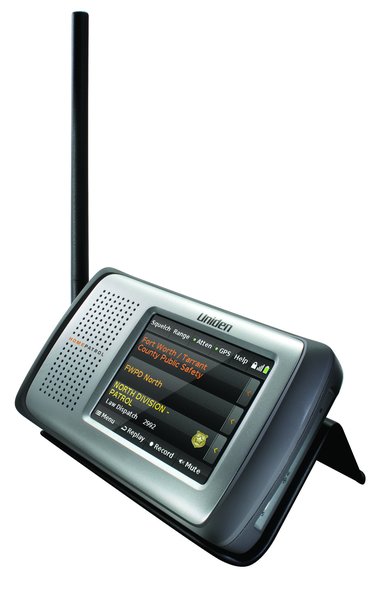
Two generations exist. The HomePatrol-1 (HP-1) shipped in September 2010 with P25 Phase I decoding and the original RadioReference database integration. The HomePatrol-2 (HP-2) followed in late 2014 and added P25 Phase II decoding as a standard feature — there is no key or upgrade to buy — along with USB charging and a larger 4 GB microSD card. Both generations share the same 3.5-inch touchscreen, the same ZIP-code workflow, free weekly database and firmware updates through HomePatrol Sentinel, the optional accessory GPS receiver, and the optional paid Extreme upgrade. The HP-1 cannot be upgraded to decode Phase II; that path never existed. The quickest way to tell them apart is the front panel: silver on the HP-1, black on the HP-2. The bench unit here is most likely the HP-2 based on era; TBD — verify against the unit (the front-panel colour settles it). Upgrades, firmware currency, and the Extreme unlock are covered in Vol 5 — Upgrades & Firmware.
Both generations are covered where they diverge; sections marked (HP-2 only) call out the delta explicitly.
1.2 Hardware tour
Both generations share one case — 149 × 84.5 × 38.4 mm (5.9 × 3.3 × 1.5 in) per Uniden’s manuals — a chunky brick by handheld-scanner standards because the touchscreen drives the geometry. The jacks sit in the same places on both: headphone, line-out, and antenna on the left side; USB and a serial GPS port on the right; Volume and Power on top. The HP-1 adds a separate DC power jack on the right side.
Display. Colour resistive touchscreen, 3.5″ diagonal. The resistive technology was the right choice for the era (fingernail-, glove-, stylus-friendly; predictable behaviour under sunlight glare) but it ages — the screen accumulates calibration drift as the indium-tin-oxide layer wears, and after 8-10 years of daily use it is common to see the touch hit-point offset by 5-10 pixels from the intended target. The calibration menu (settings → display → calibrate) corrects it; a stylus extends the useful life by reducing fingernail-edge wear at the high-traffic corners of the screen (the soft-key labels at the bottom edge see the most wear).
Antenna jack. SMA on both generations, per Uniden’s owner’s manuals; the HP-2 ships with an SMA-to-BNC adapter so a BNC-terminated outdoor antenna connects directly. The supplied antenna is a short rubber whip; it works passably across 25-1300 MHz but is mediocre on VHF-high (the trunked 150 MHz state-police systems) and poor on VHF-low (30-50 MHz legacy systems).
USB port. Mini-USB on both generations. Used for Sentinel data transfer (firmware, database, favourites lists) in Mass Storage mode and, on the HP-2, for charging and running the scanner. The paid Extreme upgrade adds a second Serial mode for USB audio streaming, raw data output, and remote control (Vol 5). Any mini-USB cable that carries data — not a charge-only cable — works.
microSD card. Both generations keep the microSD card under the battery cover (push to release). It holds the database, favourites lists, recordings, and the files that carry firmware updates — which is why a card reader can stand in for the USB cable (Vol 5). Uniden shipped a 2 GB card in the HP-1 and a 4 GB card in the HP-2; community practice is to stay at 32 GB or smaller. The database itself occupies roughly 300-500 MB depending on snapshot age.
Internal speaker + 3.5 mm headphone jack. The speaker is forward-facing, loud enough for a noisy vehicle, and as honking-treble-forward as every consumer scanner ever made. The headphone jack disables the speaker on insertion.
Battery. Both generations use 4× AA cells — a set of 2300 mAh NiMH rechargeables is included, and alkalines also work (no charging). The NiMH cells charge in place; Advanced Menu → Set Charge Time sets the charge duration (14 hours maximum). Battery life is ~7-10 hours of continuous monitoring on a 2500 mAh NiMH set, less under heavy backlight use.
Power options. The generations differ here. The HP-1 has a separate DC power jack and shipped with an AC adapter and a car charger. The HP-2 has no separate jack: it runs and charges from the mini-USB port, fed by a PC or a USB power adapter (Uniden did not include an adapter). On either model, turn the scanner off before disconnecting external power — Uniden notes that some settings are saved only as the scanner powers down.
GPS (both generations, optional). The HP-1 and HP-2 both accept an accessory GPS receiver — Uniden’s BC-GPSK, for example — on the right-side serial GPS port, using Uniden’s GPS accessory cable (BWZG1844001). With GPS attached and Use GPS selected, the scanner keeps re-selecting channels for its current location as it moves. Useful for road trips through multiple counties; not useful for home base.
The build quality is plausible-consumer rather than ruggedized: the case is moulded plastic with a soft-touch rubberized finish that wears through at the corners after a few years of belt-clip use, and the screen surround is not gasketed. There is no IP rating. Treat it as an indoor / car-cabin device; the SDS100 is the choice for outdoor incident scanning.
Comments (0)